Repair Corrupt OST File Minimum Data Loss
Microsoft Outlook employs the use of OST files for saving a synchronized copy of the mailbox content whenever there is a connection with the Exchange server, Microsoft 365,any other compatible email service
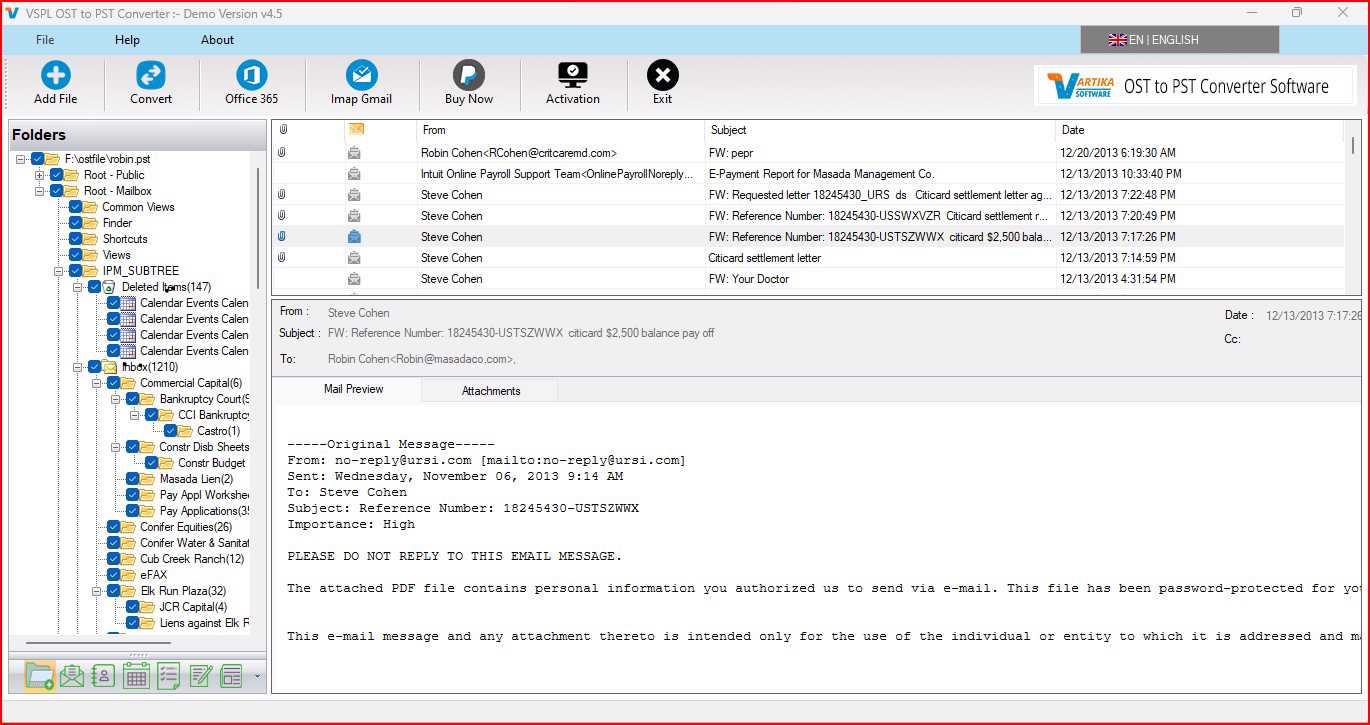
Microsoft Outlook employs the use of OST files for saving a synchronized copy of the mailbox content whenever there is a connection with the Exchange server, Microsoft 365, or any other compatible email service. The OST files may contain significant email, contacts, calendar, tasks, notes, attachments, and other mailbox content. There might be instances where an OST file may become corrupted or inaccessible due to an unscheduled shutdown of the system or other reasons like software problems, synchronization problems, storage problems, and Outlook profile problems.
In case the OST file gets corrupted, one may not be able to access the significant information from the mailbox content. In such cases, people need software that will be capable of restoring the information saved in the OST files. VSPL OST File Repair Software helps people restore the corrupted OST file. People can make use of the software for doing OST to PST Conversion whenever needed.
What Causes an OST File to Become Corrupt?
There could be various reasons why OST files get corrupt. One reason could be the improper shutdown of the computer when Outlook is accessing the mailbox database. Power failure, system crash, or the sudden termination of Outlook might also impact the OST file.
Another problem could be the synchronization problem between Outlook and the mail server. The constant disruption in the connection to Exchange Server or Microsoft 365 could lead to the corruption of the local OST database. There might also be malware attacks, disk space issues, bad sectors, and other software conflicts that might lead to the corruption of OST files.
Sometimes the Outlook Profile gets missing but the OST file contains the information regarding the mailbox. As OST files are connected to their own profiles, it might become difficult for users to access OST files using Outlook.
Why Repair a Corrupt OST File?
All the years of business communications as well as personal communications can be included in an OST file. There can be attachments, customer communications, project details, invoices, documents, and other details that should be recovered from the corrupted OST file. It is not necessary for you to lose all that valuable information because there are methods to restore the OST file.
A special tool named OST to PST Converter Software will scan the file, restore all the information that can be extracted from the OST file, and convert it to a PST file. The most important thing is to retain email properties during the process of recovery.
How Does VSPL OST File Repair Software Help?
VSPL OST File Repair Software helps to repair corrupted, damaged, or inaccessible Outlook OST files and extract mailbox data from them. VSPL OST File Repair Software helps to restore emails and other mailbox folders, and it saves the restored mailbox data in PST as well as various other formats.
It can be very helpful when your OST file is damaged, orphaned, and not accessible via your Outlook profile. Rather than relying completely on your email account, you can add your OST file in the software and scan it for restoring purpose.
Once the software scans the OST file, it can show all the available mailbox folders and items. You can choose those folders or emails that you need to restore, instead of restoring all of them.
It also maintains important email properties such as "To", "CC", "BCC", sender, subject, time, etc. in the process of conversion. The folder hierarchy can also be maintained while doing so.
Recover OST Data Without Losing Attachments
Attachments are an essential element of many emails. A mailbox can hold invoices, reports, images, presentations, PDF files, and several other documents that a user cannot afford to lose.
There is an in-built facility in the software that enables one to extract attachments together with emails while recovering them. It enables a user to save all the information related to emails.
During OST to PST Conversion, the user is thus able to save emails along with their attachments.
Selective OST File Recovery
The OST file that is huge may have hundreds or even thousands of emails with several folders. Conversion of all these things may not be needed in some cases. Therefore, selective conversion can prove to be helpful in such situations. Through this application, users can convert the desired OST folder(s) and the mailbox items that they want. In this way, users can convert only the needed parts of the OST file.
Convert OST to PST and Other Formats
The foremost reason why users fix OST files is that they want to convert the extracted data to some more user-friendly format. This software helps in converting the OST data into PST and also other file formats.
The use of OST converter to PST software enables users to export the mailbox data to PST and use it in Outlook. Apart from that, it also provides support to file formats like EML, MSG, HTML, EMLX, MBOX, Office 365, and Live Exchange Server.
Key Highlights of OST to PST Converter Software are:
Fix Corrupt OST Files: The Outlook OST Repair software is capable of fixing and retrieving mailbox contents from corrupt OST files.
Folder Level Data Extraction: Users can select individual folders as well as emails rather than extracting the entire OST file.
Recover Email Attachments: The attachments are restored along with the respective emails.
Preserves Folder Structure: While the conversion process takes place, the folder structure as well as the relevant information about the emails is preserved.
Conversion into Different File Formats: OST files can be exported into PST, EML, MSG, HTML, EMLX, MBOX, Office 365, and Live Exchange server.
No need for Microsoft Outlook: No Microsoft Outlook is needed during the process of conversion.
Splitting PST Files: Large PST files can be converted into smaller files of 5GB.
Various Mailbox Items Recovery: Emails, Calendars, Contacts, Tasks, Notes, Inbox items, and other mailbox items are exported by the software.
How to Repair a Corrupt OST File?
The procedures that are used in repairing an OST file are quite simple. First, install and run VSPL OST File Repair Software in the Windows operating system. Load the damaged OST file into the software and then scan it.
After the scanning process is complete, the software will show all mailboxes and their respective contents. The user can then preview the recoverable content and decide what needs to be converted.
Then, choose between the PST format or any other output format available and the location of the output folder. Users can opt for selective conversion or PST splitting features.
Lastly, click on the conversion process button. The software will extract the mailbox data and save it in the chosen format. Now users are able to use their PST files.
When Should You Use OST to PST Conversion?
Here are some scenarios when OST to PST Conversion proves to be very beneficial. When the initial Outlook profile does not exist, when the Exchange account gets disconnected, or the OST file is not accessible anymore, then the conversion of this recovered data into PST will prove to be a useful means of preserving the mailbox data.
Another scenario when OST to PST Conversion is useful is when users wish to make a local backup of the mailbox. This is because PST files are portable and can be stored somewhere else for future purposes.
When you have to convert an OST file to PST after the repair of a damaged OST database, you will find a converter very useful indeed.
Final Thoughts
Not all the time does a corrupted OST file result in permanent loss of crucial data stored in the mailbox. However, with the help of an appropriate recovery and conversion utility, one can scan the corrupted OST file, recover recoverable mailbox contents, keep significant properties intact, and export the contents to a usable file format.
VSPL OST File Repair Software allows the user to repair corrupted OST files, select particular mailbox folders, extract attachments, preserve folder structure, and convert the data into various file formats. If the data recovered from the corrupted OST file needs to be accessed in Outlook, then the OST to PST Converter Software can help in saving the mailbox data into PST format.
When you require OST repair service or want to convert OST to PST file, using an appropriate OST converter to PST software can help a lot.
Repair Corrupt OST File Minimum Data Loss Comments





