PST to MBOX Converter for Thunderbird and Apple Mail
In order to use the mailbox data in applications supporting the MBOX format, Microsoft Outlook saves its mailbox data in PST files. But when users have to access their mailbox archive in applications
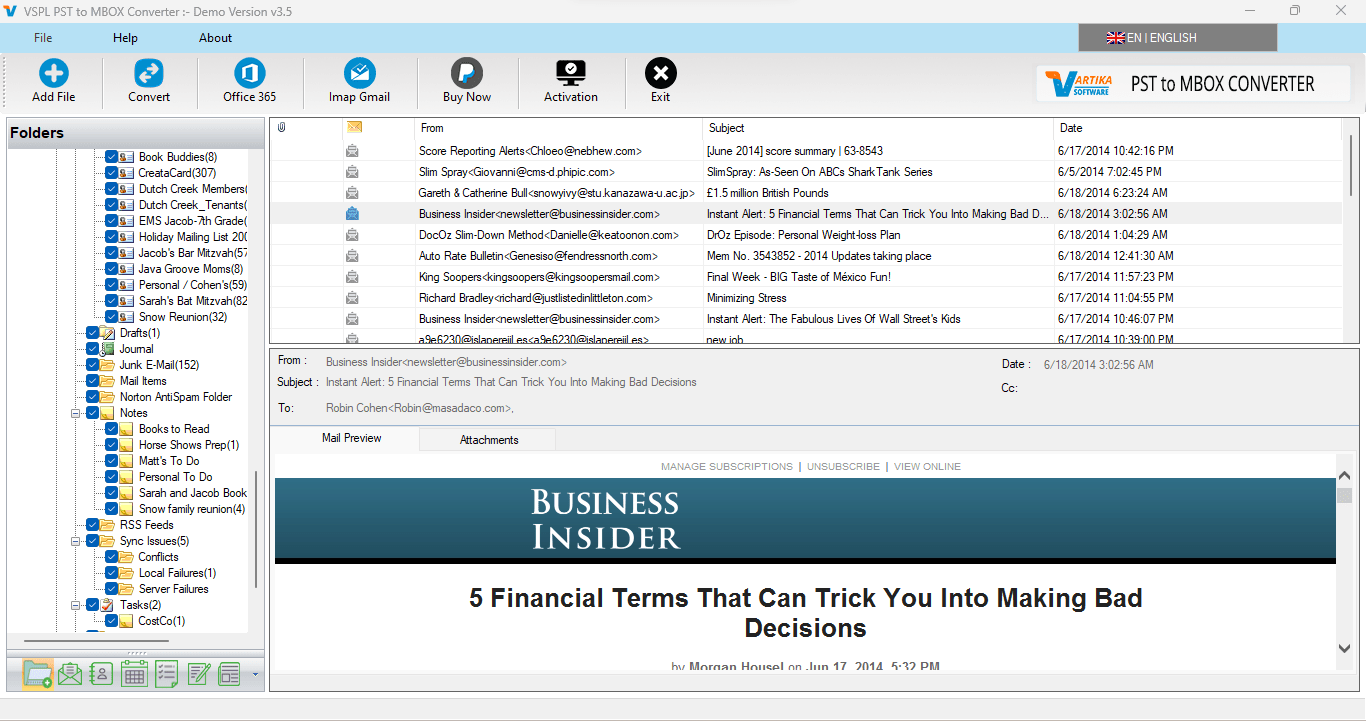
In order to use the mailbox data in applications supporting the MBOX format, Microsoft Outlook saves its mailbox data in PST files. But when users have to access their mailbox archive in applications that can use MBOX files, they require some good means to convert PST to MBOX their existing mailbox data. Applications like Thunderbird, Apple Mail, Eudora, SeaMonkey, and Netscape can use MBOX mailboxes. In these cases, the VSPL PST to MBOX Converter Software is quite useful to convert Outlook PST file to MBOX file without the presence of Microsoft Outlook software in the system.
The conversion of PST to MBOX may be required when users switch from Outlook to another desktop email software program or want to make their archived emails in Outlook accessible through MBOX supporting software application. Manual transfer of emails is not very easy especially when there is a huge number of emails stored in the PST file. This process gets easy with the use of a best PST to MBOX converter which scans the PST file and creates an MBOX file out of it.
Why Convert PST to MBOX for Thunderbird and Apple Mail?
MBOX is one of the mailbox formats which is common among many programs, hence its usefulness when one wants to move Outlook email files to other applications such as Thunderbird and Apple Mail. The VSPL PST to MBOX Converter Software is a converter which is specially designed to convert PST to MBOX Microsoft Outlook PST data into MBOX files that are easily imported by supported email clients.
The converter is capable of converting the Outlook PST file into a single MBOX file and it has email folders including Inbox, Outbox, Sent Items, Drafts, as well as other folders that have emails. This software has an option whereby one can convert the Outlook PST files while maintaining the original folder hierarchy.
It is left to the user to decide whether he wants the folder structure to be maintained or not.
How to Convert PST to MBOX?
The ideal best PST to MBOX converter conversion tool should have a user-friendly procedure for converting the files that does not require any technical expertise. The VSPL software has a simple procedure.
Firstly, open the VSPL PST to MBOX Converter Software on the Windows platform. From the main interface of the software, you can choose the Outlook PST file that needs to be converted. This software can be used to convert PST files from Outlook 2021, 2019, 2016, 2013, 2010, 2007, 2003 and older versions. The software also supports both ANSI and Unicode PST files.
After choosing the PST file, the software automatically scans the file and gives options for folders. Choose a folder to view the emails contained in the selected folder. The software has an option to preview the emails.
After having looked through all the necessary data, choose the option called Export. Set the necessary preferences including keeping the folder hierarchy and specify the destination folder. Then press the Save button and your PST files will begin their conversion to MBOX. In the process of conversion, information about folders and emails is displayed on the screen, showing you which folders are being converted and how many emails have been already processed.
The final result is that a new MBOX file is generated. It can be further exported to such applications as Thunderbird, Apple Mail, Eudora, SeaMonkey, Netscape, etc.
Import Outlook PST Emails into Thunderbird
Thunderbird users will have to access emails that had been stored in PST archive files of Outlook. Thunderbird uses MBOX mailboxes, hence making it possible to convert PST to MBOX the Outlook archives first to achieve this purpose.
Using the VSPL PST to MBOX Converter Software, users can generate an MBOX file from their Outlook PST file without the need of having Outlook installed. After generating the MBOX file, users can import it in Thunderbird. The software is also clear on the fact that conversion of PST to MBOX format for Thunderbird can be done without any file size restriction.
The converter also preserves key metadata of the emails while performing the conversion. Such metadata includes sent and received dates, To, Cc and Bcc addresses among others. The email formatting and message data are preserved in the process too.
Export Outlook Emails to Apple Mail
Apple Mail is another application which supports MBOX format of email files. Therefore, people using the Outlook application who want to migrate to the Apple Mail application will have to first convert their PST archive in order to import the emails.
The MBOX format file that is created by VSPL PST to MBOX Converter Software can then be exported to desktop applications which support MBOX format, like Apple Mail. In this way, people will have an easy way to Export Outlook emails from PST archive.
Since the software preserves the metadata of emails and their formats, the sender and recipient information will be saved when creating the MBOX file.
Convert Password-Protected PST Files
A further advantage is the ability to deal with password-protected PST files. In case an Outlook PST file is password-protected, the program allows working with password-protected PST files that it supports. It is also capable of processing both ANSI and Unicode PST files, which ensures compatibility with Outlook archives created in different versions of Outlook.
The program does not require Microsoft Outlook to be installed on the computer. This may be helpful when there is no Outlook at all or if a user needs to process an already created PST archive without working in Outlook.
Simple Interface and Conversion Monitoring
It allows using one pane for selecting the PST file, conversion, and tracking the progress of the process. It shows the user information on the folder name, number of folders, and emails that have already been converted. Thus, users have some visual representation of the conversion process.
Another good feature of the program is the creation of a new MBOX file that leaves users' initial PST archive intact. Thus, people can use the original Outlook files while having a separate mailbox for Thunderbird or Apple Mail.
Outlook and Windows Compatibility
The VSPL PST to MBOX Converter Software is compatible with MS Outlook 2021, 2019, 2016, 2013, 2010, 2007, and 2003. It is compatible with Microsoft Windows platforms such as Windows 10, 8.1, 8, 7, Vista, and various Windows Server versions. The listed system requirements are a Pentium-based processor, at least 128 MB of RAM (512 MB preferred), at least 50 MB hard drive space for the installation and plenty of space for the output.
The software has a free version that lets the users preview their PST data but saves only the first 30 messages from the selected folders. The professional version is meant to save all mail items.
Users who may need to perform PST to MBOX conversion for Thunderbird or Apple Mail should find the process easier with the help of a dedicated converter, as compared to manually transferring their emails. The VSPL PST to MBOX Converter Software is a software that includes PST compatibility, folder structure maintenance, message previewing facility, metadata preservation, PST password protection, and also provides Outlook independent conversion. With the help of the best PST to MBOX converter for this purpose, one can easily create MBOX mailboxes and Export Outlook emails.
PST to MBOX Converter for Thunderbird and Apple Mail Comments





