Turn Outlook PST Archives into Flexible MBOX Mailboxes
Managing email information in multiple email applications becomes hard when valuable emails are stored in Microsoft Outlook PST files
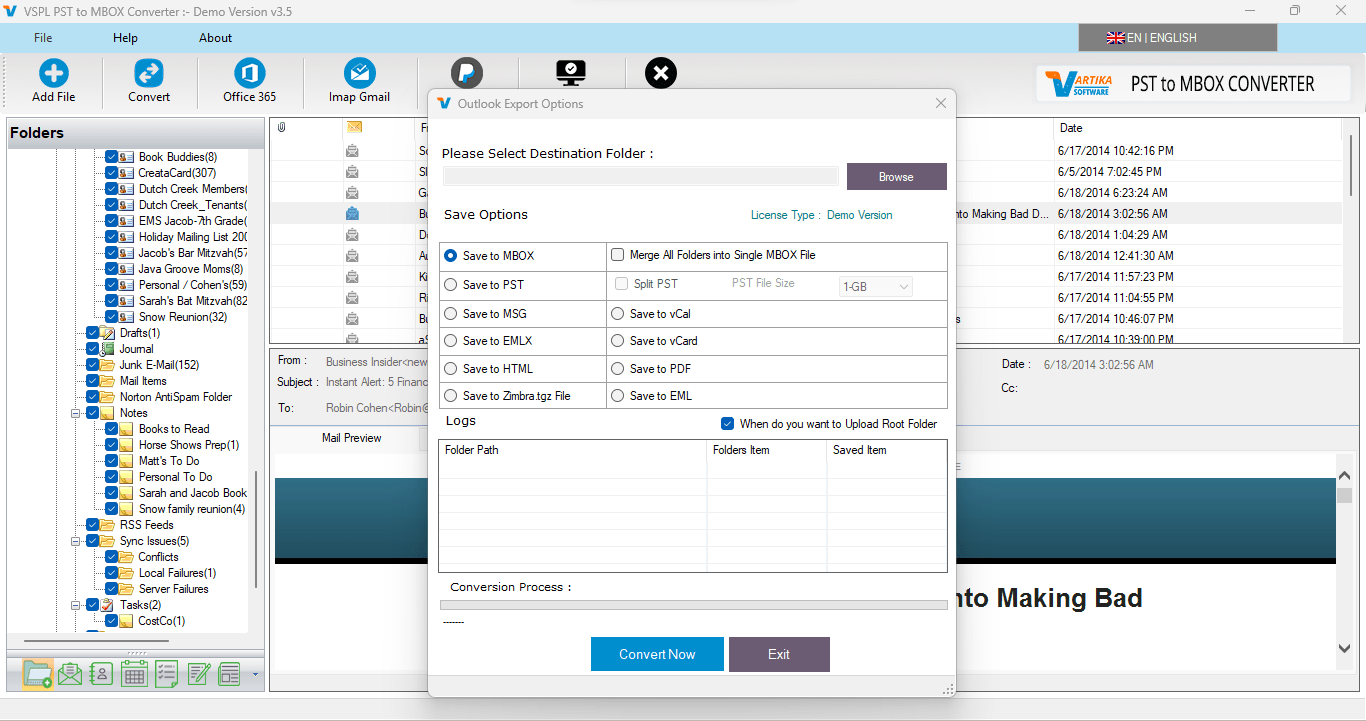
Managing email information in multiple email applications becomes hard when valuable emails are stored in Microsoft Outlook PST files. Microsoft Outlook uses PST as a widely spread way of storing emails and mailbox information, but sometimes there is a necessity to transfer this information to email applications compatible with MBOX format. In this case, the VSPL PST to MBOX Converter Software becomes a good solution to convert PST to MBOX without installation of Microsoft Outlook. The converter converts Outlook PST files to MBOX files compatible with Thunderbird, Apple Mail, Spicebird, SeaMonkey and Netscape.
There are a lot of reasons why one would need to convert Outlook PST to MBOX. One may change email application, move his archived emails to another email application or just create an additional copy of his mailbox. Manual transferring of hundreds or thousands emails becomes a complicated task. The conversion becomes much easier when the user just needs to choose the PST file and export his mailbox information in MBOX format.
The VSPL PST to MBOX Converter Software is compatible with both ANSI and Unicode types of Outlook PST files. As a result, it will be suitable for processing PST files from various versions of Microsoft Outlook. It is capable of working with Outlook 2021, 2019, 2016, 2013, and previous versions. Another key feature is that there is no need to install Microsoft Outlook on the computer.
Why Convert PST to MBOX?
MBOX is one of the mailbox formats supported by a number of email programs used on desktops. In cases where people decide to transfer their Outlook archives into an MBOX compatible email client, it becomes easier to convert the PST files rather than copy all the messages individually. With the help of PST to MBOX converter, it becomes possible to provide access to the emails stored in Outlook as MBOX files.
Such a tool may become very handy for those people who own large collections of emails from Outlook and need a quick way to convert the data. Instead of opening each message and saving it individually, the converter handles the conversion of the selected PST file and generates MBOX files.
How to Convert PST to MBOX
The conversion method is meant to be straightforward, even for users who lack complex technical knowledge. Start by installing the VSPL PST to MBOX Converter Software on a PC running Windows. The software offers an interface through which one can browse and choose the necessary PST file from Outlook.
After that, browse the PC for the necessary PST file containing the Outlook mailbox data that will be converted. The software scans the chosen PST file and then lists the available email data. This feature enables the users to view the mailbox data prior to saving it into MBOX format.
After considering all emails, extract the data that needs to be converted. This works well when you do not wish to convert all data and require only certain data from the mail box. After extracting all the necessary data, you have to choose MBOX as the export format and provide the destination where the output will be saved.
The last thing you have to do is to convert the selected PST data into an MBOX output. The obtained MBOX output can be accessed through any of the following applications: Thunderbird, Apple Mail, Spicebird, SeaMonkey, or Netscape.
Features of the Best PST to MBOX Converter Software
One of the biggest advantages of using the right PST to MBOX converter is that it will offer compatibility, flexibility, and an easy conversion process. The converter from VSPL will work with PST files in ANSI and Unicode formats and will help people handle PST archives created by various versions of Outlook. Furthermore, this PST to MBOX converter will eliminate the need to have Microsoft Outlook installed on the computer.
Another useful feature of the converter is the possibility of previewing the email archive before conversion. This way, people will be able to make sure that the information that needs to be converted is loaded in the right way.
This software is aimed at people who deal with email archives and not single emails. Instead of the manual export of emails, people will be able to convert their PST mailbox in order to get a new archive. This software is useful for both private individuals and professional people dealing with archived Outlook emails.
Export Outlook Emails Without Outlook Installation
One of the practical benefits of the software lies in the possibility to Export Outlook emails from PST files in the absence of Microsoft Outlook on the computer. It may be necessary for cases when Outlook is not installed, deleted, or even needed by the user.
The MBOX file that is created allows users to work with Outlook emails in more convenient MBOX-compliant email programs. Thus, one can Export Outlook emails from PST archives and then access this mailbox from another email environment.
Demo Version and Compatibility
The user gets the option to try the software before buying the full version. Based on the provided product details, the demo version helps the user to preview the email data and save up to 30 emails per selected folders. The full version is needed for the complete conversion of the desired mailbox data.
The tool is compatible with Microsoft Outlook 2021, 2019, 2016, 2013, and older versions as well as ANSI and Unicode PST files. The software is therefore ideal for people working with Outlook archives developed using different versions of the software.
In general, the VSPL PST to MBOX Converter Software presents a good solution for those who need to convert PST to MBOX and work with Outlook archives through MBOX supported email programs. Compatibility with various PST files and Microsoft Outlook, preview options, and ability to operate without Microsoft Outlook simplify the process of conversion significantly. The software is a perfect option for converting PST to MBOX and exporting emails from archived mailboxes to MBOX mailbox format.
Turn Outlook PST Archives into Flexible MBOX Mailboxes Comments





