Move Lotus Notes Mailboxes to Outlook with NSF Converter
NSF file is used for storing mailbox data in Lotus Notes application whereas the PST file is mostly used in Outlook application for managing emailmailbox data
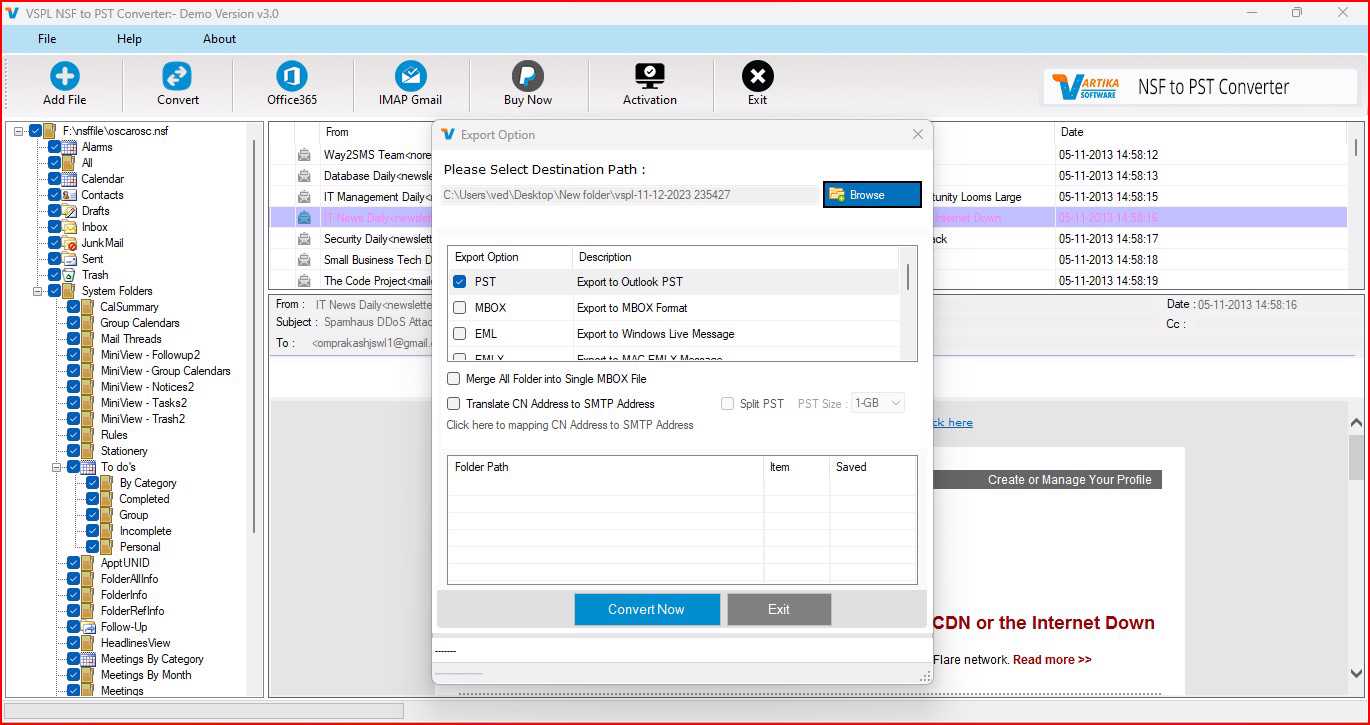
NSF file is used for storing mailbox data in Lotus Notes application whereas the PST file is mostly used in Outlook application for managing email and mailbox data. In situations where companies or individuals decide to shift from Lotus Notes to Outlook application, migration of the existing mailbox data may turn out to be quite tough. NSF to PST Converter Software offers an easy way of migrating NSF files to Outlook compatible PST files without losing the important mailbox data.
Why Convert NSF to PST?
Lotus Notes and Outlook have distinct mailbox file formats, hence direct opening of the NSF file in Outlook is not feasible. Individuals who wish to switch to Outlook from their mail system have to convert their NSF file to Outlook compatible file. The PST file is an outlook file type, which contains emails, attachments, contacts, calendars, journals, etc.
The best NSF to PST Converter Software will help users to convert their NSF file into PST file format. The software will allow users to export emails, attachments, contacts, calendars, journals, and other components of the mailbox.
Selective NSF to PST Conversion
When converting a large number of Lotus Notes database, there could be a lot of mailbox items that are not necessary for migration. Conversion of all these items will consume time and may generate unnecessary data. Hence, the application gives an option to users of converting selective mailbox items out of the available data tree.
The user is able to select particular categories like emails, contacts, tasks, calendar, and any other item supported for migration before starting the process of conversion.
Convert Multiple NSF Files in One Process
There could be several NSF databases for different users or departments in any organization. Handling each of the NSF databases separately may not be easy for the user. The converter allows for selection of multiple Lotus Notes NSF files and convert them into PST file format as well as other supported file formats.
Multiple selections of the NSF files make the NSF to PST conversion easier. Instead of converting each of the NSF databases individually, the user can now handle multiple files as per his/her requirement.
Preview NSF Mailbox Data Before Conversion
The preview option enables the user to view the contents of the data that is going to be saved after the conversion. Previewing enables one to see the items in the mailbox, such as emails, contacts, and tasks.
It may be beneficial for the user to preview his/her data before its export because after doing so, he/she will know what folders/items need to be converted. The free version enables the user to scan and preview NSF data and save up to 30 items from each chosen folder.
Preserve Mailbox Data and Folder Structure
Organizing the mailbox is an important aspect of the email migration process. Whenever the users migrate lotus notes to PST format, they always want that their emails and mailbox details are kept organized.
This tool is created in such a manner that it keeps the data related to the mailbox in its original form and migrates the supported items to Outlook PST format. It can migrate emails, attachments, contacts, calendars, and journal entries.
Multiple Saving Options
There are other file types also supported by this software apart from PST. NSF mailbox data can be converted to various file types as per the user’s needs. Some of the file types that the software supports are PST, EML, MSG, MBOX, PDF, HTML, ICS, and vCards.
Such an option can help the user in exporting data from NSF files for different reasons. For instance, the file type PST can be used for Outlook, MBOX for compatible email client, while EML and MSG for single emails. Contact/calendar related information can be stored in vCard and ICS file types respectively.
Migrate NSF Data to Office 365 and Gmail
Organizations today may have a desire to get away with the desktop version of Lotus Notes and shift to cloud-based email systems. The NSF file converter gives users the chance to export NSF mailboxes into Office 365, Microsoft 365, and Live Exchange Server. NSF files can be imported into Gmail.
In this regard, the tool is helpful not only as a file converter but also when it comes to migrating mailbox data to either local or cloud email system.
Supports Different Lotus Notes and Outlook Versions
The Lotus notes NSF to PST Converter tool is compatible with Lotus Notes versions 12, 11, 10.0.1, 9.0.1, 9.0, 8.5, 8.0.2, 7.0, 6.5, and 6.0. It is also compatible with Microsoft Office Outlook versions 2021, 2019, 2016, 2013, 2010, 2007, and 2003.
The software can work with Windows 11, 1
How to Convert NSF to PST?
The entire process of conversion is easy and simple. You will have to run the Free NSF to PST Converter program, select your NSF file that you need to convert, and allow the software to scan the file. The scanned file will show up all the available mail items which can be previewed by the user. After selecting the data, click the export button and select PST as the desired format.
Conclusion
The transition from Lotus Notes to Outlook need not result in the loss of valuable data in the mailbox. The NSF to PST Converter Software ensures that emails, attachments, contacts, calendars, journals, and all other mailbox objects can be migrated to PST files.
Selective migration, batch NSF migration, previewing of the mailbox, multiple saving options, folder retention, and Office 365 and Gmail compatibility are some of the ways through which the software offers multiple choices to handle the data in Lotus Notes. Be it NSF to PST migration, migration of lotus notes to PST, or exporting data from the NSF file to any other supported file format, the NSF Converter can help in this regard
Move Lotus Notes Mailboxes to Outlook with NSF Converter Comments





