NSF to PST Converter for Selective IBM Notes Migration
There are many uses of Lotus Notes software for managing all types of business e-mails, contacts, calendars, tasks,other details stored in mailboxes. However, if any user wants to migrate from IBM Notes
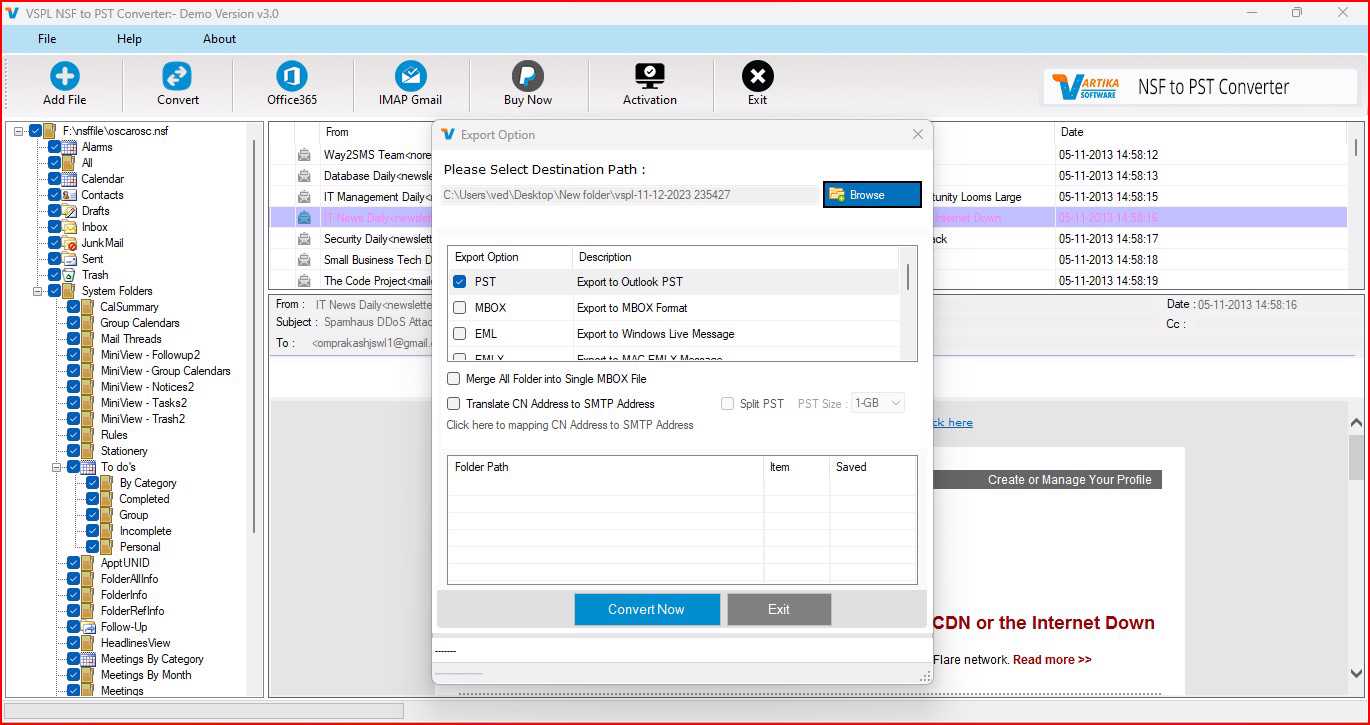
There are many uses of Lotus Notes software for managing all types of business e-mails, contacts, calendars, tasks, and other details stored in mailboxes. However, if any user wants to migrate from IBM Notes to MS Outlook, then he will have to convert his NSF database file into the compatible format as per MS Outlook. In that case, a good quality VSPL NSF to PST Converter Software will be helpful for making the whole migration process convenient.
Why Convert NSF to PST?
NSF is the original format of database supported by IBM Notes, while PST files contain the mailbox details for Microsoft Outlook. Consequently, in case a user wishes to shift from Lotus Notes to Outlook, he or she should convert the NSF data to PST. NSF to PST conversion will make the emails as well as other mailbox elements available to Outlook.
With the help of a professional converter, users may convert lotus notes to PST without manually moving each email. In addition, the program will allow the conversion of emails, attachments, contacts, calendar entries, journals, tasks and other mailbox elements available. Furthermore, selective conversion feature will be helpful for those users who wish to move only selected data from NSF database.
Selective NSF to PST Conversion
One of the significant characteristics of the VSPL NSF to PST Converter Software is selective conversion. The database in Lotus Notes may have numerous amounts of data, but not all the data might be necessary for the user. There is no need to convert the whole database. It will be enough to select the necessary information from the presented mailbox structure.
First, there is an option to scan the whole NSF file and see the available folders and components of the mailbox. After that, it is possible to choose necessary emails, folders, contacts, calendars, tasks or other items and start the conversion process.
Complete Process to Convert NSF to PST
The whole process of converting files is very simple and it can be done in a number of steps.
Step 1: Launch the Software
Install the VSPL NSF to PST Converter Software on a compatible computer and start the software. Make sure that the IBM Notes is already installed on your computer and the database is functioning well.
Step 2: Select the NSF File
After the program is executed, the user should choose the necessary NSF database. The user is allowed to go to the folder where the Lotus Notes NSF file is located and include it in the program.
Then the program opens the database and performs actions with it. If the user has several NSF files, he can work with several files at once.
Step 3: Scan the NSF Database
After selecting the NSF file, proceed with scanning. The program will analyze the database and show all of its mailboxes and features.
Scanning enables the program to identify all the data within the NSF file, allowing users to utilize the emails, contacts, calendar, journal, and other compatible objects available.
Step 4: Preview NSF Data
Prior to the export of data, the users have the ability to view what all content exists in the NSF database.
This is very helpful in checking the email and mailbox data before going ahead with the conversion process.
When the users wish to go for selective migration, they can take a look at the data and choose the folders and data items that need to be migrated.
Using the free version of the software, users can scan and preview NSF data and migrate up to 30 data items from each folder that they select.
Step 5: Select Required Mailbox Items
Once the preview of the NSF file is done, users have the ability to choose the folders or components of the mailbox that they want to convert. This feature helps users to migrate only required information without converting the entire NSF file.
For instance, users can choose email folders, contacts, calendar or journals based on their requirements.
Step 6: Choose PST as the Output Format
Once the required data is selected, go for PST as the output file format. Other file saving formats offered by the software include EML, MSG, MBOX, PDF, HTML, ICS, and vCard.
In case the objective is to convert NSF to PST for Microsoft Outlook, just select PST and specify the destination folder.
Step 7: Start the Conversion
Lastly, initiate the conversion process. The software application converts the selected NSF data into the preferred PST file. This PST file can now be accessed via Microsoft Outlook.
The procedure enables users to convert their NSF notes to outlook PST without moving each mailbox item individually.
Export NSF File to Multiple Formats
Conversion of NSF files is not the only service that this software offers. The data from NSF files can be exported into EML, MSG, MBOX, PDF, HTML, ICS, and vCard file formats. This feature comes in handy when a user wants to access his/her data from Lotus Notes through various applications or to save his/her mailbox data in various formats.
For instance, EML and MSG are used to store individual emails, while MBOX is used with some email applications.
Migrate NSF Data to Office 365 and Gmail
In addition to the conversion of PST, the software provides options for cloud platform migration. The users can migrate their NSF mailbox to Office 365, Microsoft 365, Live Exchange server, and Gmail.
Thus, this software will be helpful for businesses who want to move from Lotus Notes to cloud email solutions. As per requirement, the user can choose between converting the lotus notes to PST or migrating the supported files to the cloud destination.
Compatibility and System Requirements
The software is compatible with different versions of Lotus Notes that include version 12, 11, 10.0.1, 9.0.1, 9.0, 8.5, 8.0.2, 7.0, 6.5, and 6.0. It also supports various Microsoft Outlook versions such as 2021, 2019, 2016, 2013, 2010, 2007, and 2003.
The program is compatible with different Windows versions such as Windows 11, Windows 10
Conclusion
IBM Notes to Outlook migration is made easy by having VSPL NSF to PST Converter Software at your disposal. This software will give you a full process that involves scanning of NSF database, previewing the data in your mailbox, choosing what items to convert and then converting them into PST or other formats.
In case you are required to convert NSF to PST, convert NSF file data, and convert notes NSF to outlook PST, this software will offer you selective conversion, batch conversion, preview of files, different output formats, and cloud migration capabilities among others.
NSF to PST Converter for Selective IBM Notes Migration Comments





