What Is the Best Way to Combine Multiple MSG Files into One PST?
Email management becomes challenging in cases where the data in Outlook is stored in hundredseven thousands of MSG files individually
Email management becomes challenging in cases where the data in Outlook is stored in hundreds or even thousands of MSG files individually. While MSG works well if the user wishes to store certain emails separately in Outlook, it may not be that easy to maintain a huge number of files. Searching for old messages, arranging messages in conversation, saving attachments, and migrating the individual MSG files to another Outlook platform can turn out to be a laborious task.
What users need to do in such cases is combine all the MSG files and convert MSG to PST format. The PST format is a centralized format of Outlook data, where the user can save many messages easily. For those users who wish to merge their email collection, MSG to PST converter can help them do the task efficiently.
The Problem with Keeping Emails as Individual MSG Files
Let us imagine that one has a number of folders with emails from clients, project communications, financial and personal conversations. Each email is stored as a separate MSG file. At first glance, such a system of email backup seems rather well thought out. However, as the number of emails increases, it becomes harder and harder to find a needed email.
File names do not always reflect the contents of the email, and one has to open a few files in order to find the needed conversation. Also, the process of transferring all those emails into Outlook can be quite boring, especially when the user has to deal with several hundred files.
In this situation, an MSG Converter can come in handy.
Why PST Is Useful for Consolidating MSG Data
PST file is supposed to be created for the purpose of storing information from the Outlook mailbox in a certain order. After converting individual MSG files to PST files, it will be possible to use Outlook for the management of such data rather than using every MSG file separately.
This is particularly useful when archiving emails. In a business environment, there may be some MSG files that contain emails that are very important for clients, while in a personal environment, there could be some MSG files with personal emails.
As a result, MSG to PST Conversion is more than changing the extension of a file; it is also about centralizing individual emails and keeping some information related to these emails.
A Better Approach to Combining Multiple MSG Files
When many MSG files are to be processed, the manual method becomes the least preferable one. Processing each file manually takes time, not to mention that there is the risk of missing some of the files.
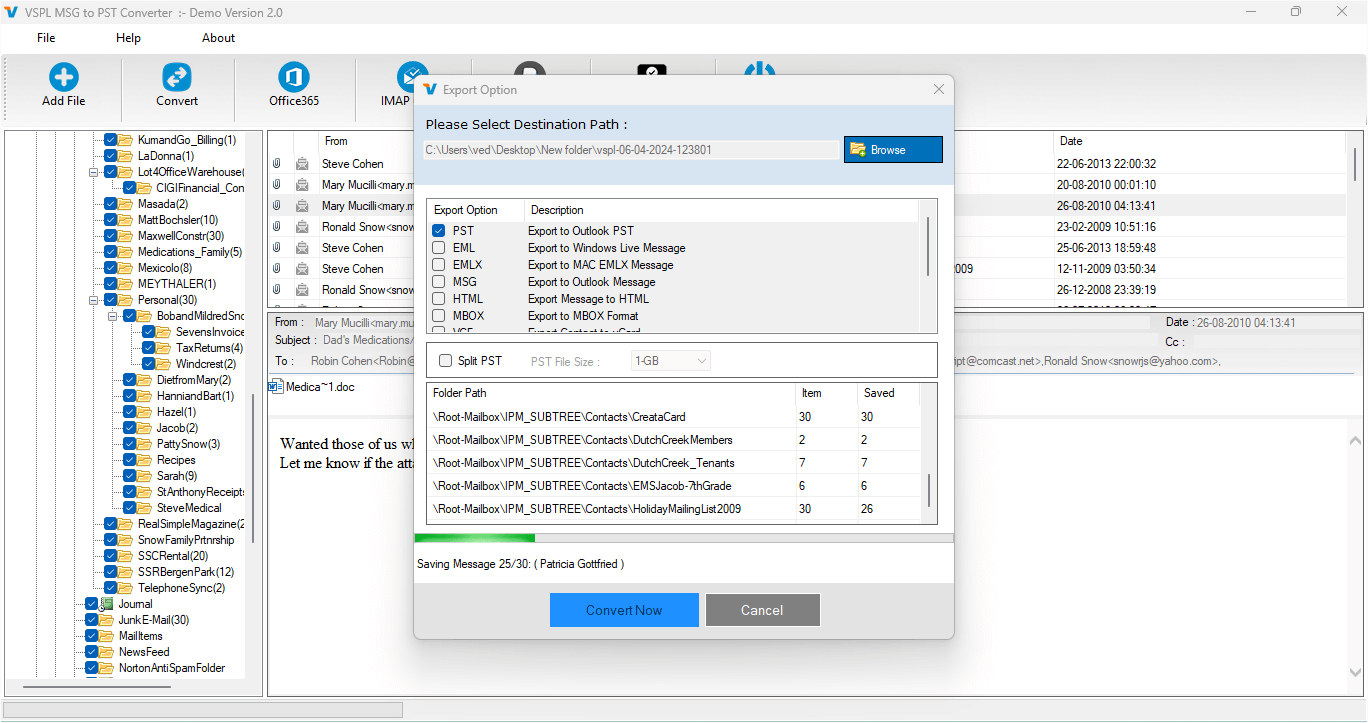
The software VSPL allows batch processing, meaning that one can load several MSG files or folders into the program and process all of them together. Batch processing is especially helpful in case when a person has numerous emails.
A user simply has to choose the appropriate source folder, let the software scan the MSG files present, examine the emails, and choose PST as the desired format of the output.
Decide What Should Go into the PST
However, merging files does not imply that all the MSG files should be merged. Email archives may include obsolete emails or duplicate entries, or they may contain some files which are not needed anymore.
The application has a preview function, which enables users to have a look at the MSG files before converting them. It enables users to determine what kind of data is contained in the source folder and pick the necessary emails.
Selective converting will be very useful in preparing the PST file for a certain project, client, department, or time frame. Users will not have to merge all the emails into one PST file.
Preserve the Information That Makes an Email Useful
However, an email is not only what one sees when opening an email message. Such information as sender, recipient, subject, date, cc, bcc, formatting, and attachments is often significant after migration or archiving.
It is necessary to preserve this information while converting MSG to PST format, because the resulting mailbox will be required for further reference. This program helps to keep all significant information and attachments of emails during the conversion.
This feature might be very helpful for companies that work with archives of previous communication. For example, some old emails might have an attached document, client's instructions, transaction details, or any other information about a project.
Keep the Existing Email Organization
An additional factor to consider when combining MSG files is the structure of the source files. When messages are already sorted in folders, preserving the same structure will ensure a better-organized PST file.
The tool has the ability to keep the structure of folders during the conversion process, which makes sure that users receive a logically organized set of email messages instead of a bunch of unstructured emails.
For big archives, preserving the structure of folders is extremely time-saving since users will not need to create categories by themselves after having the PST file.
Filtering Makes Large Archives Easier to Manage
It is not necessary for each and every archive of emails to be converted into a PST file entirely. There might be certain situations when an individual may have to convert emails of only a specific period.
Date range is another feature that can be used for filtering of source emails. With this feature, a specific period of time can be selected for the conversion process.
What If the PST Becomes Too Large?
However, there is a probability that joining hundreds or even thousands of MSG files could yield a bulky PST file.
One of the solutions provided by VSPL is the ability to split the PST file into smaller files. This provides users with more options when handling bulky PSTs obtained from conversion.
Another advantage of the program is the ability to choose the target folder where the files are saved.
A Practical Workflow for Users
The entire process is possible via an easy workflow as well. Firstly, the user selects the folder that contains the MSG files. The program analyses the available data and gives a preview. The user selects the needed emails, applies any filters, and saves them in PST format.
After specifying the destination location, the program processes the selected MSG files and generates the PST output.
This output file can then be accessed and/or imported into a compatible Outlook environment.
This removes the need for handling each individual email separately.
Final Perspective
The best way to combine multiple MSG files into one PST is the use of a specialized tool that can process bulk data but at the same time allow controlling what will be converted. Just combining files does not work, and what users should look for is a way to convert emails, attachments, and folders while preserving their data.
The VSPL MSG Converter is the perfect tool for converting individual MSG messages to PST format. Batch processing, preview, selective conversion, date filters, saving hierarchy, attachments, ability to create several PST files and split them- all this will make your work much easier.
For those who need to convert MSG to PST, this program will help organize scattered email messages into one Outlook data file. If your goal is to archive emails, organize your mailbox, migrate data, or simply access your past correspondence, MSG to PST Conversion is what you need. The Tool provides a practical approach for managing multiple MSG files in a centralized Outlook data file.
What Is the Best Way to Combine Multiple MSG Files into One PST? Comments





