What Is the Best Way to Remove or Recover PST File Password
Microsoft Outlook makes use of PST files for storing crucial information regarding the mailbox, which includes emails, attachments, contacts, calendars, tasks, notes,journals
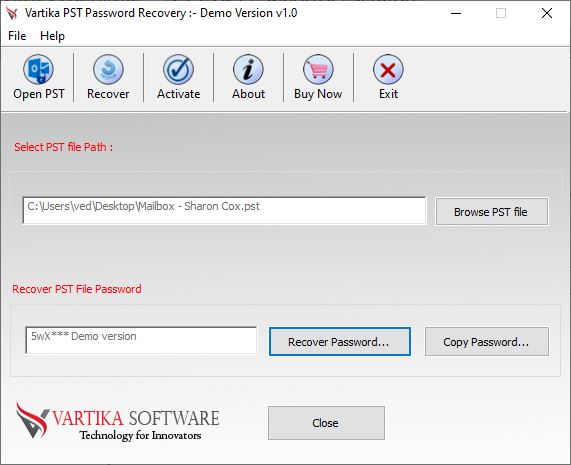
Microsoft Outlook makes use of PST files for storing crucial information regarding the mailbox, which includes emails, attachments, contacts, calendars, tasks, notes, and journals. In order to keep this information safe from any kind of access, it becomes necessary to secure the PST file with a password. However, it may result in some problems due to the fact that if the password is forgotten, then there could be trouble in opening the archive files. It should be kept in mind that the password used by an email account is not the same as the PST password.
However, there is specific software that can help people in gaining access to their own Outlook data in case they forget the password. The program VSPL PST Password Recovery helps in recovering data from password-protected, encrypted, corrupt, or inaccessible PST files.
Why Do Users Need to Recover a PST File Password?
PST files are mostly utilized for storing outdated or archived Outlook emails. The user can create password protection when he/she wants to have secure storage of his/her emails. Yet, rarely used passwords tend to get lost very fast. PST file may be transferred from an old computer or restored from some backup or even received from other computer systems. In this case, one forgets the original password.
First of all, it is necessary to realize that the PST file password differs greatly from the Outlook or email password. Email account password gives access to the online mailbox, while PST password gives access to the local Outlook file. In this case, those users who are looking for how to recover Outlook password should first of all find out what kind of password they need.
In the case, when it is an email account password, the user should use the procedure provided by the particular email account service. When it is about a password-protected PST file, one can use the dedicated solution for PST recovery.
Best Way to Recover or Remove PST File Password
In case of a legitimate access loss to a secured PST file, the VSPL PST Password Recovery Tool offers a special solution to this issue. It was created for working with password-protected and encrypted PST files as well as offering repair capabilities for corrupted Outlook data.
It supports ANSI and Unicode PST files and operates with various MS Outlook versions like Outlook 2021, 2019, 2016, 2013, 2010, 2007, and 2003.
A significant feature that makes the program easy to use is its simple interface. The user does not have to be an expert in the area of technical work in order to work with the application. The file can be chosen, scanned, previewed, and then the recovered data can be exported.
How VSPL PST Password Recovery Helps
The key advantage of employing VSPL PST Password Recovery is that it not only provides basic password recovery but also includes other types of recovery features. A problem with PST files might include several aspects at once, like a file being outdated, password-protected, corrupted, huge, or partially corrupt. Thus, there is a need for a tool that will not only support recovery but also repair of PST files.
Different elements of the Outlook mailbox can be recovered using the software, including emails, attachments, contacts, calendar, tasks, notes, and journals. One can check what information is available for recovery and only then proceed with saving the necessary information.
Recovered mailbox information can be saved in different formats, such as PST, EML, MSG, HTML, MHTML, and PDF.
Simple Outlook File Password Recovery Process
A specific Outlook file password recovery utility will simplify the process of retrieving lost data than doing difficult manual processes. First, one has to start with using the program, after which one chooses the PST file he wishes to recover the password for. The application checks the chosen file and determines the available mailbox data.
Once this is done, the program displays the recoverable folders and mailbox items in a preview window. One can look through emails, attachments, contacts, calendars, tasks, and many others that might be available. After identifying what one needs to retrieve, he can choose the desired recovery or export method and save the data to the desired destination.
Using the preview feature is useful since it allows one to view the available mailbox data before starting with the actual process of retrieving the files.
Recover PST Password Without Losing Important Data
The safety of the original PST file needs to be taken into consideration during any process of recovery of pst file password. The users need to make a copy of the original file before recovering it to ensure that the original data is safe in case there is a need for recovery using some other technique.
VSPL also offers recovery of damaged or corrupt PST files. It will help in recovering the mailbox data from supported PST files and saving the data in different output formats. It will also aid in recovering the deleted Outlook data that can still be recovered from the PST data.
In case of users dealing with oversized PST files, the software offers the ability to split the file into smaller parts.
Recover Outlook Data from Damaged PST Files
But at times, password loss is not the only issue with the PST file. Years of storage of a PST file may make it corrupt due to several reasons such as improper shutdown, storage problems, software problems, etc. If Outlook is unable to open this PST file, PST recovery software comes in handy for providing extra recovery options.
VSPL PST Password Recovery can scan and recover available mailbox details from a corrupted or inaccessible PST file. It also supports the recovery of emails with attachments and other components of Outlook. The user can even view the recovered details prior to exporting them, offering an easy way to check available details.
The user can export the recovered details to various formats like EML, MSG, HTML, MHTML, and PDF, etc.
Recover Outlook Password vs. PST Password
“Recover Outlook Password” is a common phrase used when there is trouble accessing the Outlook application by the user, although sometimes the interpretation may not be very clear. The Outlook password is for use in authorizing the email account, while the PST password protects the local data files. They are distinct passwords that require separate approaches.
If you forgot your email account password, make use of the standard recovery procedure offered by your email service provider. In case you forgot the password of the PST file to which you have access rights, it might be better to apply a specific PST recovery tool.
Knowing the difference will help you make the right choice.
Conclusion
A forgotten PST password can be a problem for users who need to access important messages stored on their Outlook email. However, it is not possible for users to recover their lost Outlook PST passwords directly from their Outlook program.
With VSPL PST Password Recovery, users can easily retrieve their data even if the data is protected by a password, is encrypted, or even if the file itself is corrupted.
Users who wish to recover a PST file password, recover an Outlook password, or recover an Outlook file password can benefit from VSPL.
What Is the Best Way to Remove or Recover PST File Password Comments





