Supported Outlook file formats:
- PST Files
- OST Files
 (Average Rating 4.7 Based on 128 Reviews)

VSPL Outlook Duplicate Remover is a professional utility designed to identify and remove duplicate items from Microsoft Outlook PST and OST files. The software helps users clean duplicate emails, contacts, calendars, tasks, notes, and journal entries, ensuring better mailbox organization and improved Outlook performance.
Managing large Outlook mailboxes can become difficult when duplicate items are scattered across folders. VSPL Outlook Duplicate Remover simplifies the cleaning process with advanced duplicate detection technology and flexible removal options.
Over time, duplicate Outlook data accumulates due to mailbox synchronization, importing/exporting PST files, backups, server migrations, and multiple account configurations. These duplicates consume storage space, slow Outlook operations, and make mailbox management difficult. VSPL Outlook Duplicate Remover provides an intelligent solution to scan Outlook data files and safely remove duplicate entries without affecting original information.
The software performs deep analysis of Outlook items using various message attributes and properties. Duplicate items are identified based on: Subject, Sender Information, Recipient Details, Message Body, Sent Date & Time, Contact Information, Calendar Details
This advanced comparison ensures highly accurate duplicate detection while preserving the original Outlook data.
Duplicate Emails
Find and remove duplicate email messages created during mailbox synchronization, PST merges, backups, or accidental duplication. Supported Email Components : Inbox Emails, Sent Items, Drafts, Deleted Items, Custom Mail Folders
Clean duplicate contact records and maintain an organized address book. Contact Deduplication Fields : Name, Email Address, Company, Contact Details
Remove repeated appointments and meeting requests from Outlook calendars. Detect Duplicates Based On : Appointment Subject, Start Date, End Date, Location, Organizers
Identify and delete duplicate Outlook tasks, personal notes, and journal entries to maintain a clutter-free mailbox.
VSPL Outlook Duplicate Remover provides flexible filtering options that allow users to control the cleaning process. Apply Filters By : Date Range, Folder Selection, Item Type, Message Attributes, Outlook Categories
Data security is one of the primary concerns during mailbox cleaning. The software uses a completely safe duplicate-removal mechanism. Safety Features : Preserves original Outlook items, Maintains folder hierarchy, Prevents accidental deletion of unique data, Supports backup creation before processing, Read-only scanning option available
Load the Outlook PST or OST file that contains duplicate items.
Step 2: Scan and Find DuplicatesThe software scans mailbox folders and identifies duplicate items using advanced matching algorithms.
Step 3: Remove Duplicate ItemsPreview detected duplicates and safely remove unwanted entries from Outlook.
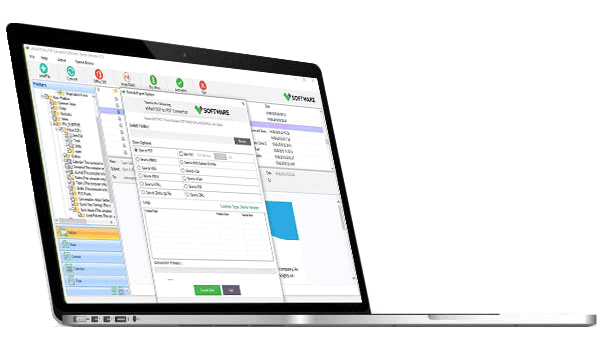
if you any need to customize in Outlook Duplicate Remover Tool then you can send mail to our support team. support@vartikasoftware.com
VSPL Outlook Duplicate Remover supports:
| Product Features | Free Version | Full Version |
|---|---|---|
| File Preview / Folder Preview/ Message Preview | ||
| Saved Items | Only Show number of Duplicate Items (Each selected folder) |
All Message Items |
| Available 24x7 Technical Support | ||
| File Recovery Preview | ||
| License Price | Free | $29 USD |
| Free Download | Buy Now |
Duplicate items may appear due to:
The software supports both:
including PST files created by various Outlook versions.
The tool can remove duplicate:
The tool compares selected properties such as:
Yes. The software allows users to:
The software supports PST files from:
The software is compatible with:
The scan duration depends on:
Removing duplicates helps:
Outlook Duplicate Remover Tools working speedperfectly is very quickly searching outlook duplicate items. Its very simple User Interface is also very simple so that, even a non-technical user can operate it without any difficulty. Thank you, developers!
Andy ReidI had a 35 GB Outlook PST file that frequently slowed Outlook down. VSPL Outlook PST Split Tool helped split the Outlook PST file into smaller PST filesmaintain the folder structure,the emails remained intact. Highly recommended
Rajesh SharmaThe software interface is simpleeasy to understand. I split multiple PST files by size without any issues. The process was fast,all attachments were preserved
Michael JohnsonThe software interface is simpleeasy to understand. I split multiple PST files by size without any issues. The process was fast,all attachments were preserved
Michael JohnsonI had a heavily cluttered Outlook mailbox with numerous duplicate emails. This tool scanned my PST file quickly and removed all duplicates with great precision. The interface is simple, and the results were impressive.
Robert Mitchell - Microsoft 365 AdministratorVSPL Outlook Duplicate Remover helped me clean up thousands of duplicate emails, contacts, and calendar entries within minutes. The software is easy to use, fast, and accurately removes duplicates without affecting important data. Highly recommended for Outlook users.
Emma ParkerA dependable application for removing Outlook duplicates. The preview option before deletion adds extra confidence, and the overall process is smooth and accurate. I would definitely recommend it to anyone facing duplicate Outlook data issues.
Michael AndersonThis tool made mailbox management effortless. It removed duplicate emails, contacts, tasks, and notes seamlessly. The user interface is intuitive, making it suitable for both technical and non-technical users.
Sarah WilliamsVSPL Outlook Duplicate Remover significantly reduced the size of my Outlook data file by eliminating duplicate entries. The scanning process was fast, and the software handled large PST files without any issues
David Thompson - Exchange ConsultantThe software performs exactly as advertised. It efficiently identifies duplicate Outlook items and allows you to review them before deletion. A great solution for maintaining an organized mailbox.
Jennifer Roberts - Business OwnerWhat impressed me most was the ability to preview duplicate items before deleting them. It gave me confidence that only unwanted duplicates would be removed. A great tool for anyone managing large Outlook archives
Sarah L.Remove Duplicate Items from Outlook File is a powerfulflexible Software Tool for Microsoft Outlook intended for the s...
The management of Microsoft Outlook data tends to get more complicated with the increasing size of your mailbox over ...
Microsoft Outlook is widely used by most people for managing their emails, contacts, calendars, tasks, notes,other vi...