Outlook Duplicate Remover – Delete Duplicate Emails, Contacts & Calendars
Microsoft Outlook is widely used by most people for managing their emails, contacts, calendars, tasks, notes,other vital mailbox data
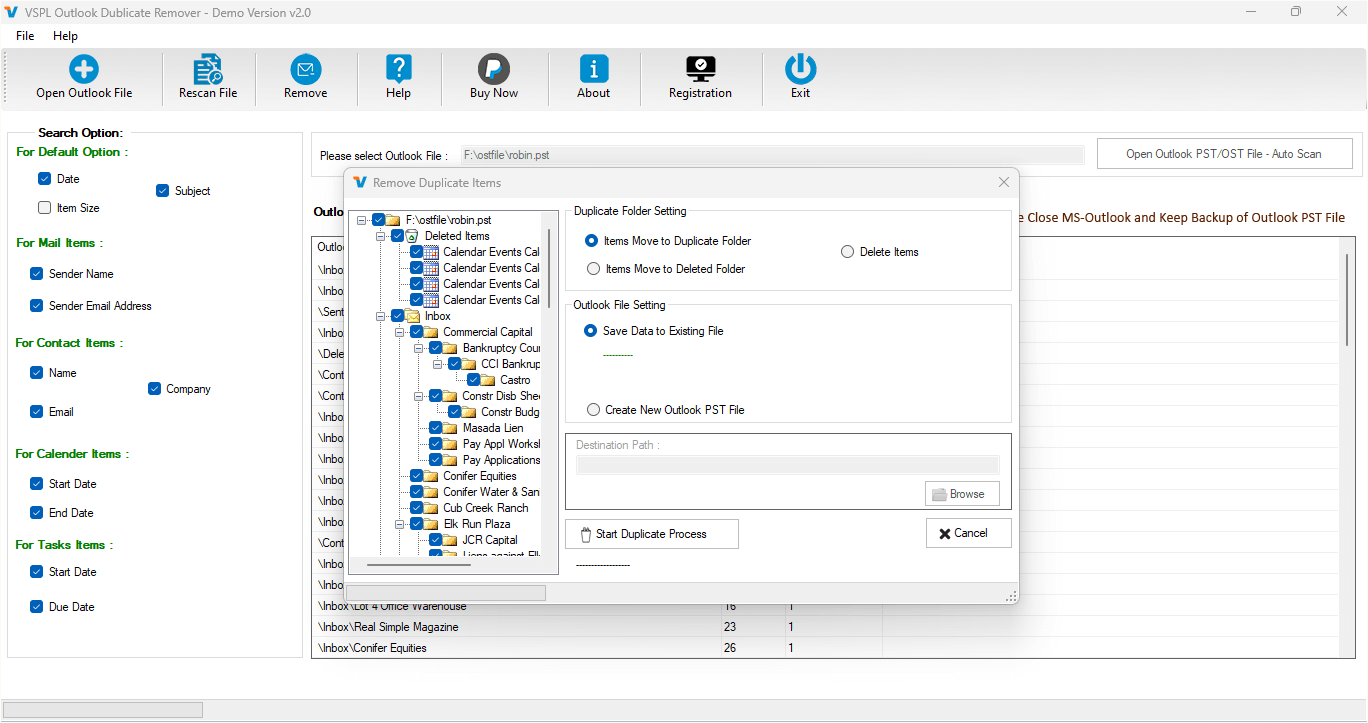
Microsoft Outlook is widely used by most people to manage emails, contacts, calendars, tasks, notes, and other vital mailbox data. Over time, Outlook PST files can accumulate duplicate mail items due to repeated imports, synchronization issues, mailbox migrations, backups, or accidental duplication. These duplicate mail items may take up your storage space, make your mailbox management difficult, and lower your productivity. An efficient VSPL Outlook duplicate remover software will help you to detect and eliminate redundant duplicates of Outlook files.
Outlook Duplicate Remover – Delete Duplicate Emails, Contacts & Calendars is a software that helps scan Outlook PST files for any repeated emails, contacts, calendar appointments, tasks, and other supported items. As indicated in the description of the product, this software is capable of scanning duplicate items in selected Outlook folders and eliminating them on the basis of several fields, including To, CC, subject, and date. The Outlook software version supported includes Outlook 2021, 2019, 2016, 2013, 2010, 2007, and even earlier versions.
Why Do Duplicate Items Appear in Outlook?
The presence of Outlook duplicate data is caused by several reasons. The same PST file could be imported many times, the account can be synchronized repeatedly, or backup files can be restored. Moreover, mailbox data can be moved among Outlook profiles. Thus, the same e-mail message, contact or calendar entry can appear twice or more.
If there are many duplicates of data contained within one PST file, the verification of each folder would be a very difficult task. People who need to learn how to delete duplicate files in Outlook require a tool that will help them to perform an automatic scan of the selected folders and find out duplicates automatically.
Efficient Way to Remove Duplicate Outlook Data
There is an easy way of getting rid of duplicate mailbox items in PST files through the Outlook PST file duplicate email remover software. Rather than looking at each and every message individually, you will be able to choose one of your PST files and then let the program do all the rest by analysing its folders. The program will search for duplicate items automatically and then show you how many duplicated messages have been found in the folders.
One of the useful features of the program is that it can analyse different types of Outlook data. You will be able to get rid of duplicate emails but also contacts, calendars, tasks, and some other mailbox items that are supported by this program. This feature makes it possible to keep your PST file clean and organized.
It is also worth noting that the program can identify duplicates on the basis of various fields. Sender and recipient information, CC, subject and date will help you identify duplicates.
Key Features of Outlook Duplicate Remover Tool
There are a number of features provided by the VSPL Outlook duplicate remover Software that are expected to make PST cleanup easier. First, there is a fast search for duplicates. This tool allows users to quickly find duplicated content by automatically scanning selected PST folders and finding repeated items. This may significantly reduce the amount of time needed for PST cleanup.
Also, the feature of removing duplicate emails from selected Outlook PST files is available. For example, one needs to choose the required PST file, let the application scan it and then remove the duplicates found. One can also perform a PST clean-up of password-protected PST files that is useful when working with secured Outlook mailboxes.
The software is compatible with both ANSI and Unicode PST files. It also works with any version of Outlook starting from outdated versions and up to Outlook 2021. It is also not necessary to install Microsoft Outlook for performing PST cleanup.
Also, there is an option of saving cleaned data from the mailbox into a new PST file. For instance, after duplicate removal, one can save the resulting PST at a chosen location on his/her computer. This means getting a separate output file.
How to Remove Duplicate Files from Outlook PST?
If you are looking for ways on how to get rid of duplicate files in Outlook, there are a number of simple methods for doing that. The first step is to run the application of the Outlook Duplicate Remover and choose the needed Outlook PST file on your PC. Once chosen, the application will scan the selected file and show its folder structure.
Having scanned the file, the application will look for duplicates in the folders automatically. Users can view the results of the duplicates found by the application and continue with the removal process. The final step is to click on the option to remove the duplicate items.
This procedure is really useful, especially in case of big PST files, since it simplifies the searching process significantly.
Preserve Important Outlook Properties
Elimination of duplicate entries must never result in loss of critical information contained in emails. The Outlook Duplicate Remover application ensures that metadata properties like To, From, CC, BCC, Date, and Subject, among others, are kept intact when processing Outlook PST files.
Users will be able to keep critical message information after eliminating duplicates.
Furthermore, the application can offer runtime duplicate status while processing the data.
Clean and Organized PST Data
Mailbox having too many duplicates becomes hard to handle. Duplicates can complicate searching, increase the size of the PST file and become redundant for folders. The use of an Outlook PST file duplicate email remover will enable you to handle your mailbox as it will be able to identify any duplicates and eliminate them.
The process of removing duplicate items from PST data will be particularly handy after migration of mailboxes, restoration of PSTs, multiple imports, or consolidation of data. Cleaning duplicates will make your Outlook data easier to handle.
The application also comes with a demo/freeware version, which will be able to identify the number of duplicates in chosen folders, while the full version can also have the feature of saving all message items.
Conclusion
Deleting duplicate files in Outlook manually may not be an easy task. When there are thousands of emails, contacts, calendars, and tasks present in a PST file, it becomes tough to delete the duplicate files. The Outlook Duplicate Remover is a solution that offers the facility to perform a scan on the PST file, find out the duplicate entries, and delete those.
Those who are interested in knowing how to delete duplicate files from Outlook without the process of manual checkup of every folder will find it easier to perform the task by adopting a duplicate-removal tool. The use of VSPL Outlook Duplicate Remover software will be useful for getting a clean PST file.
Outlook Duplicate Remover – Delete Duplicate Emails, Contacts & Calendars Comments





