Migrate EML to PST Easily – Complete Step-by-Step Guide
Email data is significant in both professionalpersonal communication channels. EML is one of the common file formats utilized by many email programs to store single email messages
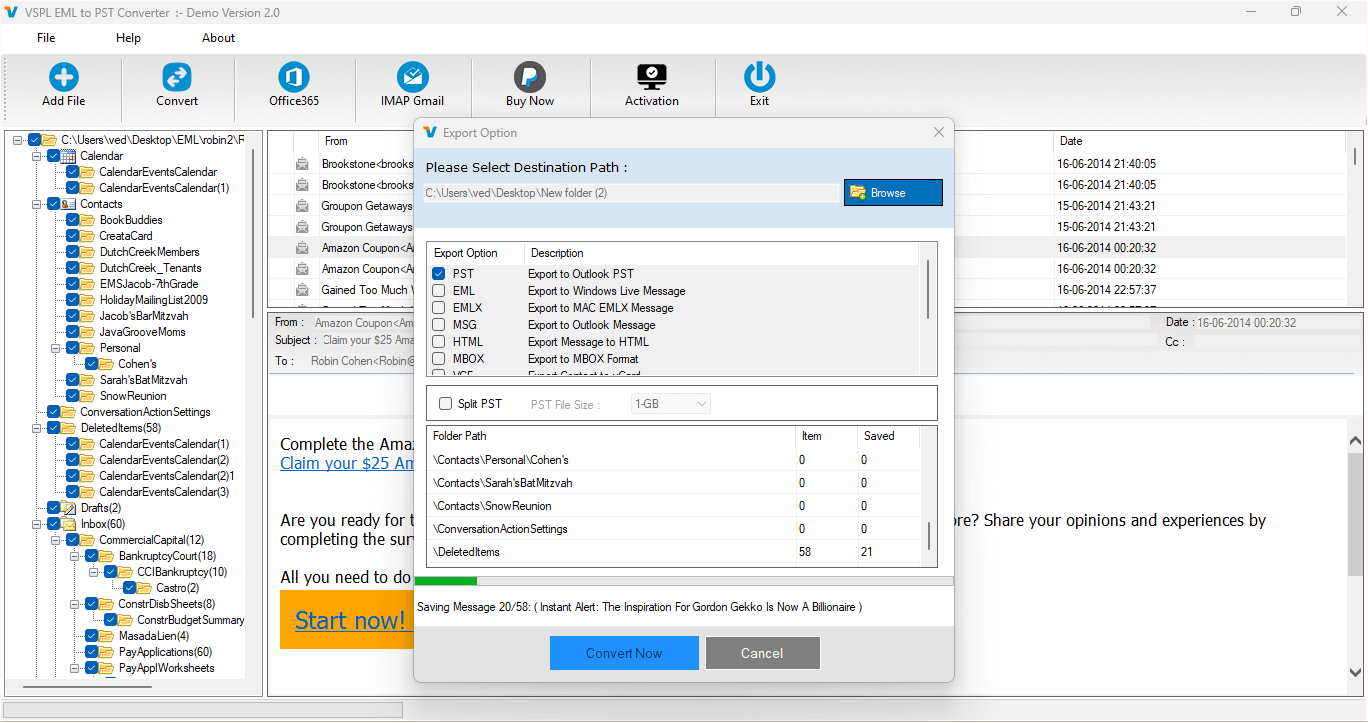
Email data is significant in both professional and personal communication channels. EML is one of the common file formats utilized by many email programs to store single email messages. EML can store the complete content of the message body, sender and recipient information, subject, date, attachments, and other email features. Nevertheless, handling several separate EML files could prove challenging for most people. Many Microsoft Outlook users usually prefer PST since it enables storing several emails within a single Outlook data file. That is the reason many people seek a convenient and reliable method of EML to PST conversion.
The VSPL EML to PST Converter Software helps in making this conversion process simple. The software enables people to load their EML files, scan folders of such files, preview emails, verify attachments, select required files, and transfer data to PST format. Users can use this software to save EML data in other supported formats as well as move emails to Office 365.
Why Do Users Need to Migrate EML to PST?
EML files are mostly saved in the form of individual email files. In cases where there are just a few email files, it is easy for the user to deal with the issue. However, this becomes difficult when there are hundreds or even thousands of EML files saved in different folders. It becomes time-consuming for the user to open and manage each file separately.
With PST files, it becomes easier for the user to manage his/her email data from Outlook. Multiple emails can be stored in one PST file, which will make it easier for the user to manage and access the emails from Outlook. Hence, in this case, the conversion of EML files to PST files becomes important when users wish to transfer emails from other EML-supported applications to Microsoft Outlook. This is why users prefer to convert EML to PST for easier email management.
Prepare EML Files Before Conversion
Before the migration, it would be wise to store all EML files that need to be converted in one convenient place. If the EML files are not stored in the same folder but scattered all over the computer system, then they can be stored in one place to ease the task.
It would also be important for users to check whether these EML files have any attached documents. If users are working on corrupt EML files, then EML file recovery is also important before migrating to PST.
The VSPL EML to PST Converter Software has the option of scanning and previewing EML files before the conversion. This makes it unnecessary to convert useless files.
Step 1: Load EML Files
The initial process involves installing the software and importing the EML files to be transferred. The software comes with a feature that automatically scans for EML files and presents the folders available.
Manually selecting the EML file location is also an option. This is helpful if the user knows where the required files are located and wants to avoid scanning the whole computer.
Once the data has been imported, the available EML folders and emails will be shown on the software. The user can now select which folder he wants to work on before they convert EML to PST.
Step 2: Preview Email Messages
EML to PST conversion requires some precautions prior to the process itself. The program has got a preview function allowing users to look through the contents of particular EML and EMLX files.
With the help of preview, users will be able to check the message body, information about an email, and possible attachments. Preview of the content becomes especially useful when the number of emails is quite high since users will be able to check required messages before the export process.
Previewing of the content is also useful for EML file recovery since users will know what messages are recoverable and what not.
Step 3: Select Required Emails
One of the advantages of having a dedicated converter tool is that one does not necessarily have to convert all emails. The software has various features that enable one to choose selective items based on their needs.
There are filters that can be applied depending on the characteristics of the emails, such as the subject, period, attached files, among others. This allows one to choose the necessary emails instead of converting all the EML files.
Selectively converting emails is an advantage both to the individual and organizationally. This saves time and space when only particular email messages are needed. Users can easily convert EML to PST according to their specific requirements.
Step 4: Maintain Email Folder Structure
Organization of emails is no less crucial than the emails themselves. While transferring emails from EML to Outlook, users might want the hierarchy of the folders and subfolders to stay intact.
In the course of EML to PST conversion, the software will preserve the folder structure as well as all original email attributes. This way, users will be able to find the emails more easily even after transfer.
The folder structure will be especially useful for those users who have different folders for projects, clients, personal emails, sent emails and other categories. They will not have to re-create folders anew.
Step 5: Choose PST as the Destination
Once the required EML emails have been selected by users, they can opt for PST as the destination format. This is the main step to convert EML to PST.
Users have the option to either create a new PST file or import the EML emails and their attachments to an existing PST file.
This will prove beneficial for those users who wish to make an Outlook archive or include the EML emails to an existing PST data file. The program aims at saving all the essential email attributes so that users can access their data after conversion.
VSPL EML to PST Converter Software has other export formats such as MSG, MBOX, HTML, and Office 365. Hence, users can choose the destination based on their email management needs.
Step 6: Export EML Data to Office 365
However, PST is not the sole option to which the user can migrate their emails. People who are transferring their email contents to a cloud mailbox may use the Office 365 migration option that is available within the software.
The utility lets the user specify their Office 365 account details and choose the target folder. This may help some enterprises and individuals who want to transfer their EML files directly to the cloud mailbox.
It will help them avoid migrating first to PST and then migrating again, in case their requirements match the Office 365 export option.
Support for Multiple EML Applications
Among the various useful attributes that the program offers is the ability to process EML files from different email clients. The software supports EML and EMLX file formats of platforms like Windows Mail, Windows Live Mail, Thunderbird, Eudora, and Outlook Express.
The program is therefore handy for those people having emails in different clients and intend to move their data to Outlook. Users do not have to open individual EML files, but simply load the required folders and migrate them using the single program.
No Need to Install Microsoft Outlook
Also useful is the fact that the installation of Microsoft Outlook is not required on the computer in order to carry out the conversion process. This may prove useful to those users who possess EML files but lack Microsoft Outlook on their computer.
Some of the Outlook versions that the program supports include Outlook 2021, 2019, 2016, 2013, 2010, 2007, and 2003. In addition, it also works on supported Windows operating systems.
Why Choose a Dedicated EML Converter?
Methods for transferring EML emails manually can get pretty difficult if there is a large number of emails present. In this case, people will have to open, copy, move, or import emails that might take up a lot of time.
There is an alternative solution to the problem through a converter. The converter allows the user to scan the folders, preview emails, pick necessary emails, preserve the folder structure, and export the files in the format they require.
VSPL EML to PST Converter Software combines all the above features into one piece of software. It can be used in case people require converting EML to PST, EML to PST conversion, EML file recovery, and migration of EML files to other possible locations.
Final Words
EML migration into PST doesn't have to be a difficult task. Through the use of correct tools, EML files can be organized and migrated to a compatible Outlook file with ease.
The VSPL EML to PST Converter Software allows users to choose from several options, including scanning the EML files, previewing the messages and attachments, selecting emails, maintaining folders, and exporting the files to a PST file. This tool is capable of supporting many EML email formats and it allows for exportation of data to MSG, MBOX, HTML, and Office 365.
In case one wishes to convert EML to PST while still organizing the email files, this software provides an easy way of performing the whole process. With preview, selective conversion, folder maintenance, and other export options, the EML to PST conversion process becomes easy for one who has both large and small EML files to convert.
Migrate EML to PST Easily – Complete Step-by-Step Guide Comments





