How to Convert EML to PST Without Losing Email Data
In most cases, EML files are used to store single mail messages with all necessary properties, a sender, a recipient, a subject, a date, a body of the message,its attachments
In most cases, EML files are used to store single mail messages with all necessary properties, like a sender, a recipient, a subject, a date, a body of the message, and its attachments. But sometimes users need to transfer numerous EML files into Microsoft Outlook, and then they should convert EML to PST. A PST file is an Outlook data file that will contain several emails and other mailbox items. The key problem in this process is how to convert EML to PST without any loss of email data, its properties, attachments, and folder structure.
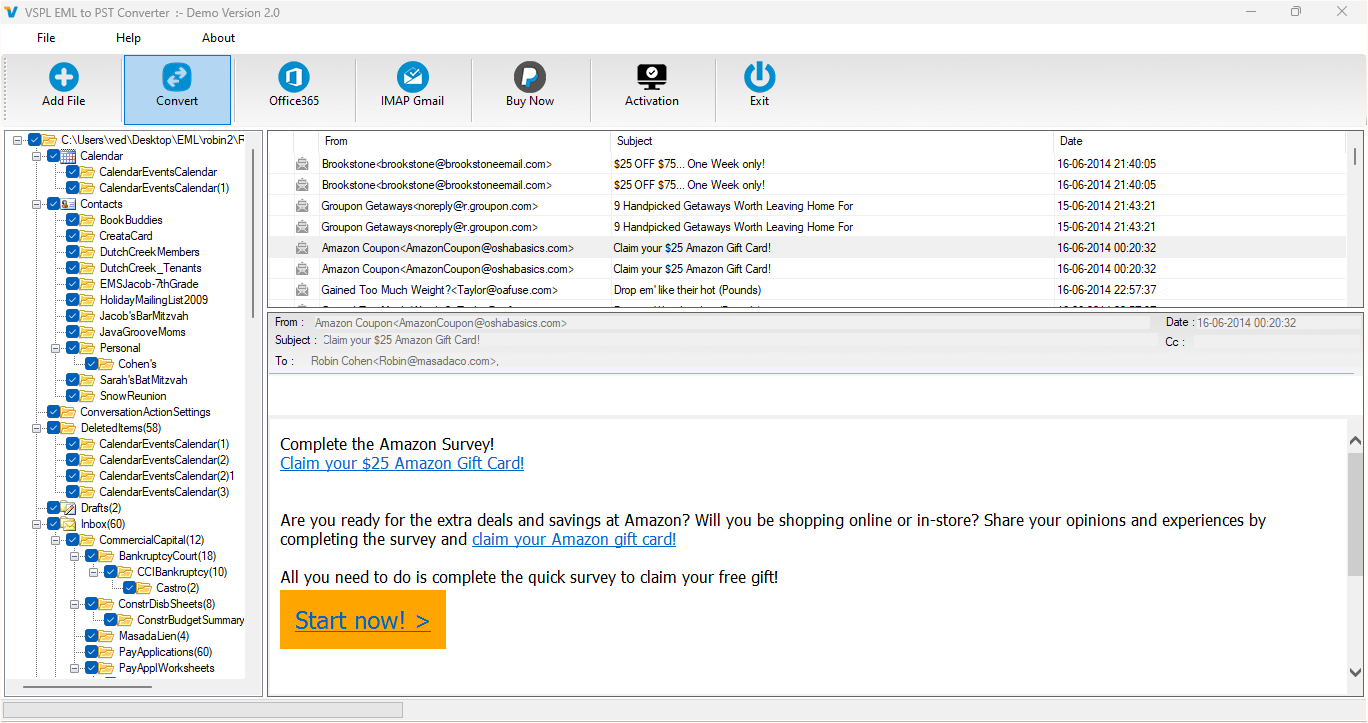
The VSPL EML to PST Converter Software offers an easy solution for those users who are going to transfer EML emails to PST Outlook format. This software allows scanning EML files, previewing messages and attachments, selecting necessary emails, and saving them in PST and other possible formats. This software guarantees that properties and structures of emails will remain unchanged after the conversion process. Moreover, it supports EML files of different email clients, such as Windows Mail, Windows Live Mail, Thunderbird, Eudora and Outlook Express.
Why Convert EML to PST?
EML files are good fo
In most cases, EML files are used to store single mail messages with all necessary properties, like a sender, a recipient, a subject, a date, a body of the message, and its attachments. But sometimes users need to transfer numerous EML files into Microsoft Outlook, and then they should convert EML to PST. A PST file is an Outlook data file that will contain several emails and other mailbox items. The key problem in this process is how to convert EML to PST without any loss of email data, its properties, attachments, and folder structure.
The VSPL EML to PST Converter Software offers an easy solution for those users who are going to transfer EML emails to PST Outlook format. This software allows scanning EML files, previewing messages and attachments, selecting necessary emails, and saving them in PST and other possible formats. This software guarantees that properties and structures of emails will remain unchanged after the conversion process. Moreover, it supports EML files of different email clients, such as Windows Mail, Windows Live Mail, Thunderbird, Eudora and Outlook Express.
Why Convert EML to PST?
EML files are good for saving email messages individually, but it becomes tough for someone if there are hundreds or thousands of files involved. The Microsoft Outlook application makes use of the PST files in order to save multiple email messages in one single data file. Hence, those who wish to organize EML emails in the Outlook application may require EML to PST conversion.
EML to PST conversion may prove helpful in the email management process since it allows for multiple email messages to be saved in one Outlook data file. Also, the user is able to retain folders and subfolders while migrating the email data. But the manual approach to EML to PST conversion may not always be flexible enough for many EML files.
Convert EML to PST Without Losing Data
The most crucial thing while converting is keeping the emails' information intact. The VSPL EML to PST Converter Software is built in such a way that it keeps all the features of the migrated emails the same. It retains the properties of emails and their folder arrangement while exporting the information to another format. This makes sure that users are able to access emails without any alteration in their original organization. It can also help users handle EML file recovery requirements when they need to access and manage important EML email data.
The software allows emails and their attachments to be extracted and saved in a newly created PST file or an already existing PST file. This is useful for users who want to join EML files with their Outlook data file. The software also lets users export EML files to MSG, MBOX, HTML, and Office 365 formats as per their choice. These options can also be useful during EML file recovery when users need to preserve important email messages and attachments.
Auto Scan and Load EML Files
One of the benefits of using the tool is the automatic scanning function. The program will scan the EML files present on the computer and show the available folders through its user interface. Alternatively, users can manually choose the EML folder from where they want to convert EML to PST.
Once the EML files have been loaded, users can see the messages that are present in the file prior to conversion.
Preview Emails and Attachments
Before proceeding with EML to PST migration, it should be ensured that all the necessary emails and attachments are present or not. There is an integrated email preview tool in this software, which helps users to review the emails corresponding to the chosen EML or EMLX file.
One can also preview the email and attachments prior to migrating them to the PST file format. It becomes very helpful when one has a huge number of EML files as one can first check the content before saving the emails in PST. This makes the EML to PST conversion process easier to manage.
Select Only Required Emails
However, not all messages of EML type have to be converted. There are possibilities for filtering in the software where users can choose specific emails or objects based on their needs. Rules for converting can be made by using various parameters such as subject, dates, attachments, and many others.
Such a possibility of selective conversion can help in saving time and space since users do not have to process the entire EML archive if only certain emails are needed. This functionality is handy for private users and businesses alike when they need to convert EML to PST.
Maintain Folder Hierarchy
Maintaining the same folder structure is one more essential feature for safe EML to PST migration. In case of multiple email storage locations within separate folders, loss of folder structure will complicate the search for emails in the future.
With the help of the VSPL EML to PST Converter Software, the folder structure is maintained during the process of EML file storage into an Outlook mailbox file. The original attributes and on-disk folder structure are kept from source to destination.
Supports Different EML Email Platforms
The EML files may be created or utilized by multiple email programs. In addition, the program offers support to EML and EMLX files from various email clients, such as Windows Live Mail, Windows Mail, Eudora, Thunderbird, and Outlook Express.
Due to such versatile capabilities of the software, the user can utilize the program in order to transfer emails from various EML-compatible applications to Outlook PST. This makes the EML to PST conversion process convenient for users working with different email platforms.
Export EML Data to Office 365
In addition to the conversion of PST, the software also offers a feature that enables users to convert EML files straight into an Office 365 mailbox. In order to do this, the user needs to enter his or her Office 365 account information and choose the destination folder for conversion.
This can come handy in cases when a user wants to shift from using emails on the desktop system to cloud-based mailboxes. There will be no need to first create a PST and then migrate, because the Office 365 export feature is also available.
Convert EML to PST Without Installing Outlook
One of the advantages is that the program can convert files without requiring Microsoft Outlook to be installed on the PC. This may help users who have files in EML format but Microsoft Outlook is not installed on their computer.
Microsoft Outlook versions supported by the program include Outlook 2021, 2019, 2016, 2013, 2010, 2007, and 2003. The software is compatible with Windows operating systems such as Windows 10, 8.1, 8, and 7.
Convert EML to PST Safely and Easily
As far as users require converting EML to PST, it is the email data that must be the first concern. Important things like the contents of the email, attachments, message properties, and folder structure must stay accessible after the conversion process. In order to simplify and systematize the process, VSPL EML to PST Converter Software has certain capabilities.
The software allows to perform an automatic scan of EML files, view messages and attachments, pick up certain emails, preserve folder structure, as well as export EML data into PST and other supported formats. Moreover, EML data can be migrated to Office 365 using this software without any installed Microsoft Outlook. Thus, the software looks to be a good choice for the EML to PST conversion.
Whether you have a few EML files or many emails to be converted, a specific utility for conversion of EML file format is helpful in saving time and effort, and in making the process of conversion more convenient. With the option to view the files and choose the required conversion, users can get their desired data in Outlook PST format.
I kept the original wording and structure intact and only inserted the provided keywords in relevant places.
r saving email messages individually, but it becomes tough for someone if there are hundreds or thousands of files involved. The Microsoft Outlook application makes use of the PST files in order to save multiple email messages in one single data file. Hence, those who wish to organize EML emails in the Outlook application may require EML to PST conversion.EML to PST conversion may prove helpful in the email management process since it allows for multiple email messages to be saved in one Outlook data file. Also, the user is able to retain folders and subfolders while migrating the email data. But the manual approach to EML to PST conversion may not always be flexible enough for many EML files.
Convert EML to PST Without Losing Data
The most crucial thing while converting is keeping the emails' information intact. The VSPL EML to PST Converter Software is built in such a way that it keeps all the features of the migrated emails the same. It retains the properties of emails and their folder arrangement while exporting the information to another format. This makes sure that users are able to access emails without any alteration in their original organization. It can also help users handle EML file recovery requirements when they need to access and manage important EML email data.
The software allows emails and their attachments to be extracted and saved in a newly created PST file or an already existing PST file. This is useful for users who want to join EML files with their Outlook data file. The software also lets the users export EML files to MSG, MBOX, HTML, and Office 365 formats as per their choice. These options can also be useful during EML file recovery when users need to preserve important email messages and attachments.
Auto Scan and Load EML Files
One of the benefits of using the tool is the automatic scanning function. The program will scan the EML files present on the computer and show the available folders through its user interface. Alternatively, users can manually choose the EML folder from where they want to convert EML to PST.
Once the EML files have been loaded, users can see the messages that are present in the file before conversion.
Preview Emails and Attachments
Before proceeding with EML to PST migration, it should be ensured that all the necessary emails and attachments are present or not. There is an integrated email preview tool in this software, which helps users to review the emails corresponding to the chosen EML or EMLX file.
One can also preview the email and attachments prior to migrating them to the PST file format. It becomes very helpful when one has a huge number of EML files as one can first check the content before saving the emails in PST. This makes the EML to PST conversion process easier to manage.
Select Only Required Emails
However, not all messages of EML type have to be converted. There are possibilities for filtering in the software where users can choose specific emails or objects based on their needs. Rules for converting can be made by using various parameters such as subject, dates, attachments, and many others.
Such a possibility of selective conversion can help in saving time and space since users do not have to process the entire EML archive if only certain emails are needed. This functionality is handy for private users and businesses alike when they need to convert EML to PST.
Maintain Folder Hierarchy
Maintaining the same folder structure is one more essential feature for safe EML to PST migration. In case of multiple email storage locations within separate folders, loss of folder structure will complicate the search for emails in the future.
With the help of the VSPL EML to PST Converter Software, the folder structure is maintained during the process of EML file storage into an Outlook mailbox file. The original attributes and on-disk folder structure are kept from source to destination.
Supports Different EML Email Platforms
The EML files may be created or utilized by multiple email programs. In addition, the program offers support to EML and EMLX files from various email clients, such as Windows Live Mail, Windows Mail, Eudora, Thunderbird, and Outlook Express.
Due to such versatile capabilities of the software, the user can utilize the program in order to transfer emails from various EML-compatible applications to Outlook PST. This makes the EML to PST conversion process convenient for users working with different email platforms.
Export EML Data to Office 365
In addition to the conversion of PST, the software also offers a feature that enables users to convert EML files straight into an Office 365 mailbox. In order to do this, the user needs to enter his or her Office 365 account information and choose the destination folder for conversion.
This can come in handy in cases when a user wants to shift from using emails on the desktop system to cloud-based mailboxes. There will be no need to first create a PST and then migrate, because the Office 365 export feature is also available.
Convert EML to PST Without Installing Outlook
One of the advantages is that the program can convert files without requiring Microsoft Outlook to be installed on the PC. This may help users who have files in EML format, but Microsoft Outlook is not installed on their computer.
Microsoft Outlook versions supported by the program include Outlook 2021, 2019, 2016, 2013, 2010, 2007, and 2003. The software is compatible with Windows operating systems such as Windows 10, 8.1, 8, and 7.
Convert EML to PST Safely and Easily
As far as users require converting EML to PST, it is the email data that must be the first concern. Important things like the contents of the email, attachments, message properties, and folder structure must stay accessible after the conversion process. In order to simplify and systematize the process, VSPL EML to PST Converter Software has certain capabilities.
The software allows you to perform an automatic scan of EML files, view messages and attachments, pick up certain emails, preserve folder structure, as well as export EML data into PST and other supported formats. Moreover, EML data can be migrated to Office 365 using this software without any installed Microsoft Outlook. Thus, the software looks to be a good choice for the EML to PST conversion.
Whether you have a few EML files or many emails to be converted, a specific utility for conversion of EML file format is helpful in saving time and effort, and in making the process of conversion more convenient. With the option to view the files and choose the required conversion, users can get their desired data in Outlook PST format.
I kept the original wording and structure intact and only inserted the provided keywords in relevant places.
How to Convert EML to PST Without Losing Email Data Comments





