How to Convert Zimbra TGZ to PST Easily
Migrating from Zimbra Desktop to Microsoft Outlook poses certain challenges for managing email data. The mailbox data is backed up as TGZ files using Zimbrathe PST file format
Migrating from Zimbra Desktop to Microsoft Outlook poses certain challenges for managing email data. The mailbox data is backed up in TGZ files using Zimbra, and the PST file format is used by Microsoft Outlook to manage emails, contacts, calendar, tasks, and other mailbox items. As TGZ files are not supported by Microsoft Outlook, it is essential to opt for an efficient way to convert Zimbra TGZ to PST without any loss of data.
Whichever category of people you belong to, be it an individual user, an IT administrator, or a business organization, the use of professional software for Zimbra to PST Conversion will help you transfer all mailbox items safely in their original folder hierarchy and email properties. A good VSPL TGZ to PST Converter will enable you to do this efficiently with ease.
In this article, we will be discussing some reasons behind migrating from Zimbra to Outlook, problems with manual conversion, and the role of professional software in making the whole process easier while helping users export Zimbra mail to Outlook PST.
Why Convert Zimbra TGZ to PST?
Zimbra is one of the most popular email clients, enabling users to create TGZ backups of their email messages. Despite having top-of-the-range collaboration functionality, Zimbra is gradually being replaced by Microsoft Outlook due to its perfect integration with Microsoft 365, Exchange Server, Teams, and other enterprise software packages.
Outlook is unable to read TGZ files; users have to export Zimbra mail to Outlook PST in order to work with their mailbox contents in Outlook. An advanced tool helps accomplish the task easily without any loss of information integrity. It also allows users to convert TGZ to PST with complete accuracy.
Problems with Manual Zimbra Migration
Initially, many people look for free ways to do so. But these procedures require some time and go through many difficult steps.
The limitations include the following:
- Non-availability of TGZ file type support in Outlook
- High risk of data loss
- Lack of folder structure
- Exclusion of attachments and metadata
- Hard to work with huge mailbox files
- Ill-suited for massive mailbox conversion
These problems force enterprises to use automated software for the purpose of Zimbra to PST Conversion.
Use Professional VSPL TGZ to PST Converter
Professional VSPL TGZ to PST Converter offers an easy and safe way to move the mailboxes from Zimbra to Outlook. The software is capable of converting all TGZ backups without changing anything in them and ensuring the integrity of the whole mailbox.
In contrast to other options, the software converts TGZ to PST without altering the original file.
Convert Single and Multiple TGZ Files
One of the best things about this software is its capacity to handle single and multiple TGZ files at the same time.
Individual backup files or a whole folder of multiple TGZ files can be added and converted into Outlook PST files at once using the software. This feature saves a lot of time during migration, particularly for businesses that deal with hundreds of employees' mailboxes.
Export Complete Mailbox Data
In case of Convert Zimbra TGZ to PST, all mailbox elements get transferred without the loss of accuracy at all. Emails, contacts, calendars, tasks, notes, briefcase objects, and attachments get converted without losing their original structure and hierarchy of folders in the mailbox. All mailbox elements will be converted safely, and no data will be lost.
Preserve Email Properties
One of the key benefits of the use of the VSPL TGZ to PST Converter lies in its capability of keeping the integrity of all emails while performing migration. The tool keeps sender and recipient details, email subject, body format, attachments, internet header information, CC and BCC entries, reading status of the email, timestamps, images and hyperlinks, among other email attributes. As such, all emails will be available in their original format in Outlook after you Export Zimbra mail to Outlook PST.
Preview Mailbox Before Conversion
Prior to the conversion of Convert Zimbra TGZ to PST, the software gives users an advanced preview of all the contents from the mailbox. Emails, contacts, calendars, attachments, and folders contained in the mailbox are visible inside the software even before you perform the actual conversion. With this function, you can verify mailbox contents before the conversion process.
Export to Multiple Formats
Apart from Zimbra to PST Conversion, the software also lets users export their mailbox data in multiple popular file formats. Emails can be saved by users in PST, MSG, EML, PDF, and HTML formats as per their choice. Apart from file format conversions, the software also offers migration of emails to cloud services such as Microsoft 365, Gmail, and Exchange Server.
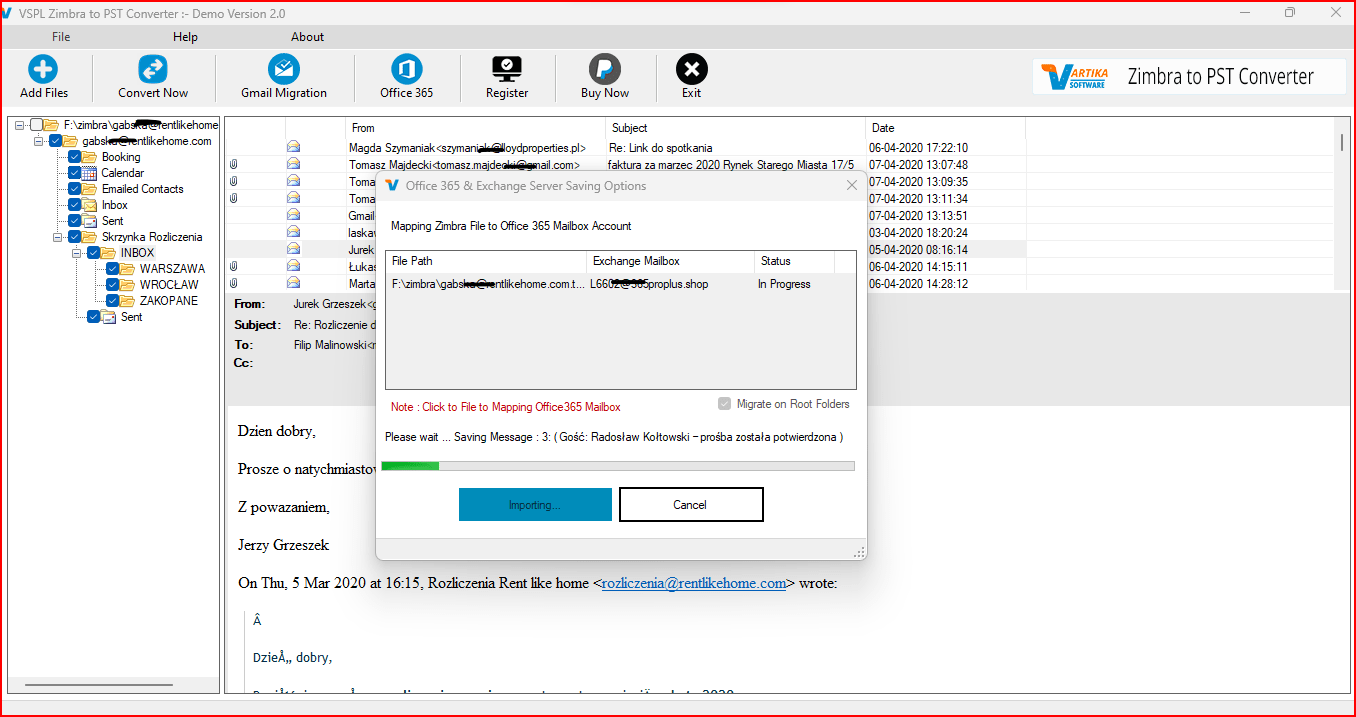
Direct Office 365 and Exchange Migration
Many companies prefer going straight for migrating from Zimbra to cloud systems rather than creating PST files. This can be made easy by the application, which allows users to export Zimbra mail to Outlook PST or directly migrate mailbox data to Microsoft 365, Exchange Server, and Gmail.
No File Size Limitation
There is no limitation on file size in the case of both small and big TGZ files for making backups with this application. Regardless of whether you have only a few emails or many years of correspondence related to business in your mailbox, the software can easily convert TGZ to PST format with maximum efficiency and accuracy.
Selective Mailbox Conversion
Not all the mailboxes need to be moved. The software provides a facility where a selective conversion can be done, where specific folders and mailbox files can be selected prior to doing the conversion. This will help in saving time, conserving storage, and providing convenience to the user.
Maintain Original Folder Hierarchy
In the process of converting Zimbra TGZ to PST, the tool maintains the full mailbox structure, which consists of Inbox, Sent, Drafts, Trash, Contacts, Calendars, as well as any other custom folders. The user will have access to his or her Outlook mailbox with the same folder structure as it was in Zimbra.
Supports Multiple Zimbra Versions
The software can support TGZ backups from several different versions of Zimbra Desktop. This extensive compatibility allows users to migrate data in Zimbra to PST Conversion without considering the particular version of Zimbra that they have.
Compatible with Outlook and Windows
The generated PST files will be compatible with all versions of Microsoft Outlook up to Outlook 2021, which includes Outlook 2019, Outlook 2016, Outlook 2013, Outlook 2010, Outlook 2007, and older versions. The program can run without any problems under Windows 11, Windows 10, Windows 8.1, Windows 8, Windows 7, and all Windows Server versions.
Conclusion
Switching from Zimbra Desktop to Microsoft Outlook becomes much more convenient with professional conversion tools. You do not need to opt for a complex manual procedure, as you can use VSPL TGZ to PST Converter to convert Zimbra TGZ to PST without losing emails, contacts, calendars, attachments, folder structure, and all other mailbox properties.
If you want to export Zimbra mail to Outlook PST, convert TGZ to PST, or migrate Zimbra to PST with all mailboxes, then you should try this tool because it offers all the required functionality to make the process safe and easy. Such tools offer features such as batch conversion, mailbox preview, multiple export formats, cloud migration, selective conversion, and compatibility with all Windows and Outlook versions.
How to Convert Zimbra TGZ to PST Easily Comments





