Is it possible to open OST files as PST files on my computer
If you have an offline Outlook email file in the form of OST Fileyou are wondering whether you are easily open it as PST File on your computer — the answer is: not directly.
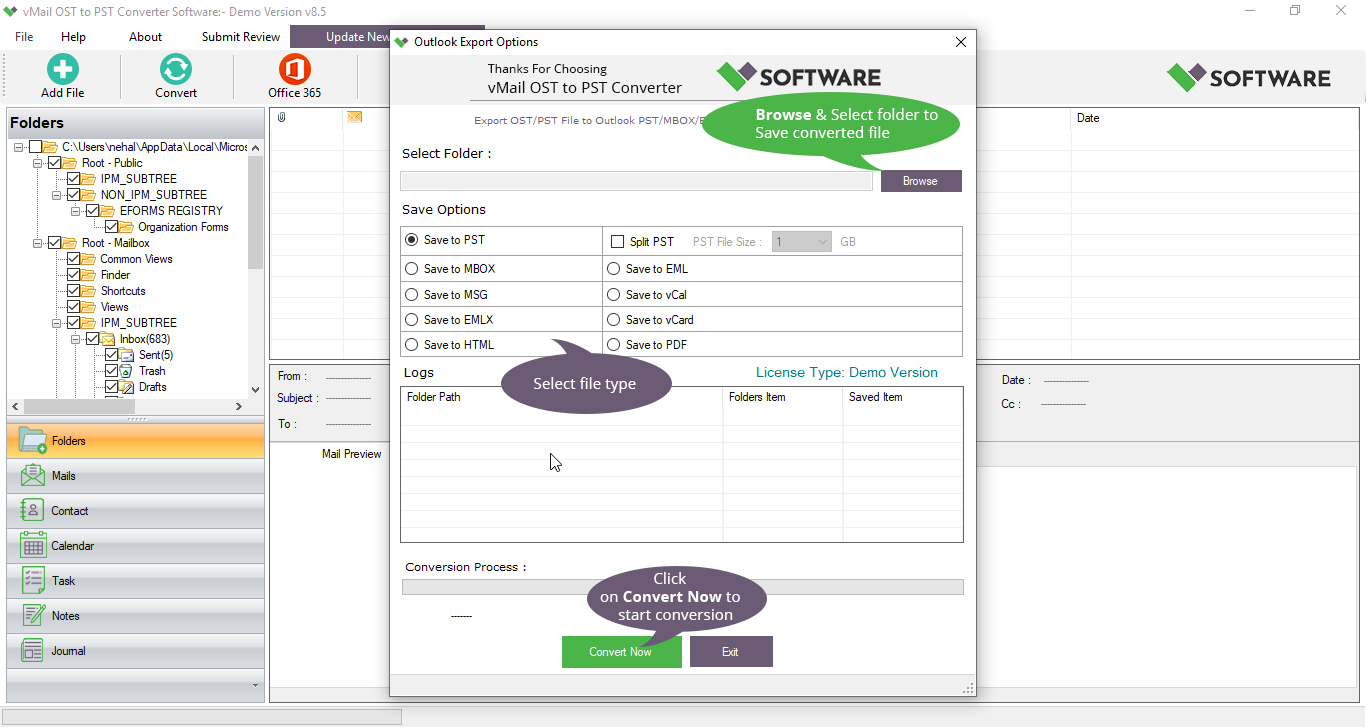
If you have an offline Outlook email file in the form of an OST File and you are wondering whether you can easily open it as a PST File on your computer, the answer is: not directly. Because of the way Outlook and Exchange handle Outlook OST Files, you will need a proper conversion process. That is where a trusted tool like vMail Outlook OST to PST Converter Software comes as a solution. The software allows you to repair corrupted, damaged OST files and perform perfect OST to PST Conversion, gives you complete access to your email data on your computer.
Why you can’t just open an OST file as a PST
Outlook OST Files are created by MS Outlook when you configure it with an Exchange, Office 365 accounts and IMAP Server accounts. The Outlook OST File mirrors your mailbox data offline and syncs when the connection failed. Because Outlook OST Files are tied to specific outlook profile, Outlook, Exchange account, and Outlook can’t simply “open “and OST File as a PST on a different machine or profile.
By contrast, PST Files are portable, significant and can be opened in any Outlook profile on your computer. So, to recover data from OST File and Convert OST to PST, you need a dedicated OST File converter to PST Software. Without this conversion, your email data remains locked inside a container that Outlook won’t recognize under a different profile or System.
How the vMail OST to PST Converter bridges the gap
The vMail OST to PST Converter from vSoftware, it is made with highly advanced features and capable to extract emails, contacts, calendars, task, notes and other mailboxes items from outlook OST File files — even damaged, corrupted or orphaned ones — Export them into PST and other format such as- MBOX, MSG, EML, vCard, HTML, PDF, Gmail, Office 365 & Exchange Server.
- It helps you repair damaged Outlook OST files and recover completely mailbox items such as Inbox, Sent Items, Drafts, Contacts, Calendars, Tasks, Notes and Attachments.
- It helps you export to PST, MSG, HTML, PDF, vCard EML, MBOX, & vCal formats.
- Software maintaining folder/ sub-folders structure, metadata (To, CC, BCC, Date/Time) and attachments during the migration time.
- Preview of all OST File items before conversion and Export into PST File.
- It is best tool that also import data from OST File into cloud services such as Exchange Server, Office 365, Gmail/IMAP.
- Software supports all MS Outlook versions (Outlook 2021, 2019, 2016, 2013, 2010, 2007 and earlier).
In short: if you are looking for an Outlook OST converter that fulfils the conversion requirement securely and reliably, this is a solid solution.
When and why you should convert OST to PST
There are many practical scenarios where you will want to use the recover and Export OST to PST method.
- Server or profile inaccessible: If you are Exchange account has been removed, or the server is unavailable, your Outlook OST File may become corrupted and orphaned. Migration gives you access again.
- Conversion to a new Outlook Profile: Rather than re-sync from scratch, migrating Outlook OST to PST File saves time and preserve your historic mailbox and emails properties.
- Archiving and backup: Outlook PST Files are easier to move and import then PST File. Migrating ensures your data is portable.
- Corruption, synchronization failure, or large OST files: Manual repair of Outlook OST may fail, an OST to PST Converter Software overcomes limitations.
In case, relying solely on Outlook built in convert may not suffice, especially if you can’t open the OST File at all. That is where professional tools shine.
Conclusion
You cannot simply open an OST file as a PST file on your computer without conversion. If you try to do so, Outlook will often refuse or fail to access the data. The smart method is to use an enthusiastic OST to PST conversion tool like vMail OST to PST Converter. This guarantees you safely extract, convert and access your Outlook data, whether you're moving machines, retrieving mailbox data after server change, or archiving email for the long term.
Is it possible to open OST files as PST files on my computer Comments